A FiveM server only starts with a valid license key from Cfx.re. In this guide you fill it in and give your server a name and a maximum number of players.
1. Create a license key
- Log in to the Cfx.re portal with your Cfx.re account.
- Go to Server Registration Keys and create a new key.
- Copy the key. It starts with
cfxk_.
Does the portal ask for your server's IP address? Then type nslookup gnode1.elitestarhosting.com in a command prompt, with the name from your own server address, and use the address you get back.
Never share your key: anyone who has it can start a server with it.
2. Fill in the key
- Open your server in the game panel and go to server.cfg editor.
- Paste your key in License Key. The field only shows dots; use the eye icon to see what is in it.
- Click Save and restart your server.
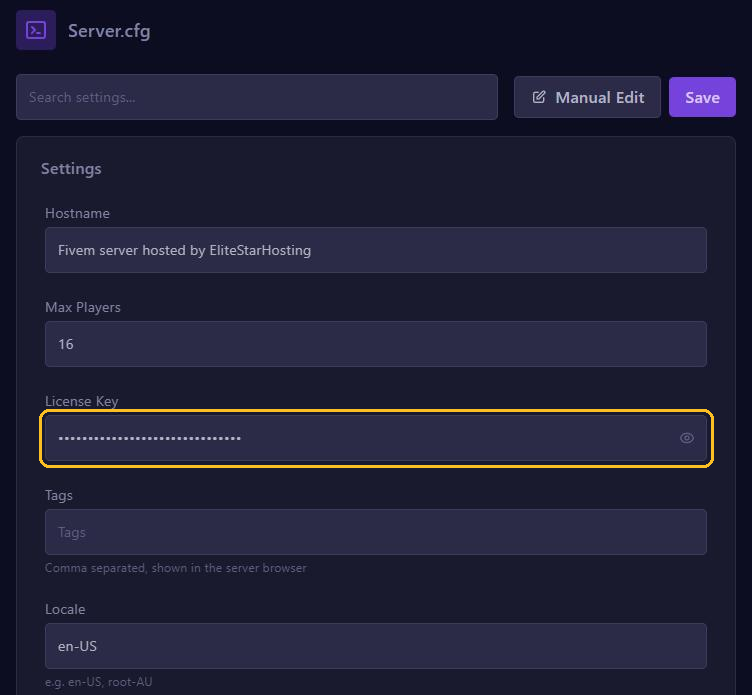
Is there also a key under Startup in FXSERVER LICENSE KEY? Fill in the same key there.
3. Name and player slots
In the same server.cfg editor you change:
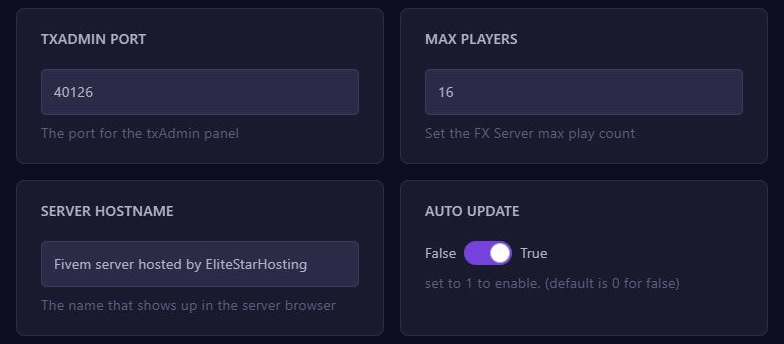
- Hostname: your server's name in the FiveM server list.
- Max Players: how many players can be on at the same time. Want more than 32 players? Also set OneSync to on.
- Tags: words players can find your server by, separated by commas.
Click Save and restart your server. The name and player count are also under Startup; keep them the same as in your server.cfg.
Connecting to your server
Open FiveM, press F8 and type connect followed by your server address, for example connect gnode1.elitestarhosting.com:30126. After a restart your server also shows up in the server list under the name you set in Hostname.
Error: Could not authenticate server license key
Do you see this message in the console and does your server keep restarting? Then the license key is wrong or no longer exists.
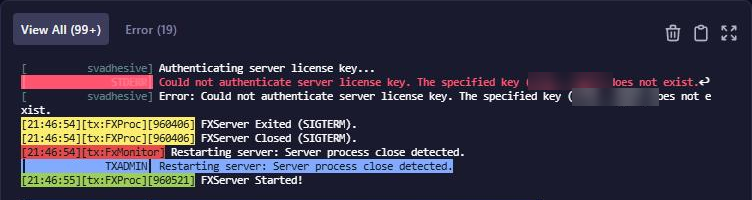
Create a new key in the Cfx.re portal, fill it in as described above and restart your server.