Want to manage your server together, for example with a friend or a moderator? Add that person as a subuser. You decide what a subuser may do, and you never have to share your own password.
Adding a subuser
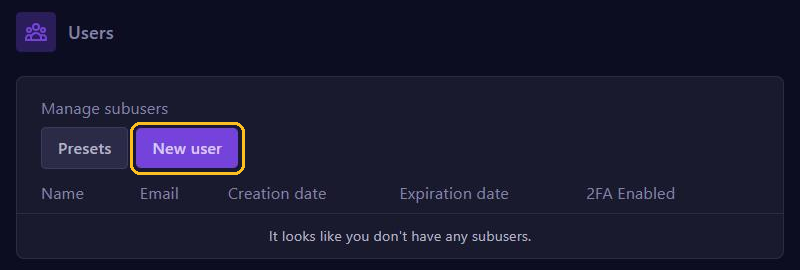
Go to Users in the menu and click New user.
- In User Email, fill in the email address of the person you want to add.
- Optionally pick an Expiration Date. On that date the subuser loses access automatically, which is handy for temporary help.
- Tick the permissions the subuser gets. Use Search permissions to find a permission, or Select all permissions to give everything.
- Click Invite User.
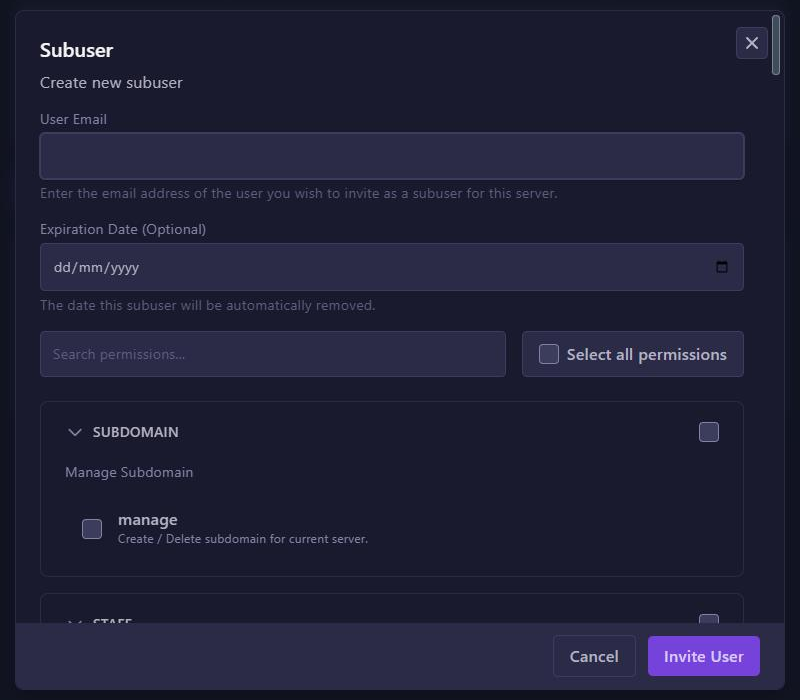
The subuser gets an email. If that person doesn't have a game panel account yet, one is created and they can set their own password.
Which permissions should you give?
The permissions are grouped by section. The most important ones:
- CONTROL: use the console and start, restart and stop the server.
- FILE: view, edit and upload files, including over SFTP.
- BACKUP: create, download and restore backups.
- ALLOCATION, STARTUP and USER: manage ports, startup settings and other subusers.
Don't give more than needed. A moderator often only needs CONTROL.
With Presets you save a fixed set of permissions, so you can pick it in one go for the next subuser.
Changing or removing a subuser
The Users page lists all your subusers, with the date their access expires and whether they use 2FA. Use the buttons next to a subuser to change the permissions or remove the subuser. Removing takes away access straight away.