Some plugins and mods store their data in a MySQL database, for example LuckPerms, CoreProtect or an economy plugin. In the panel you create such a database in a few clicks. How many databases you can create depends on your plan.
Creating a database
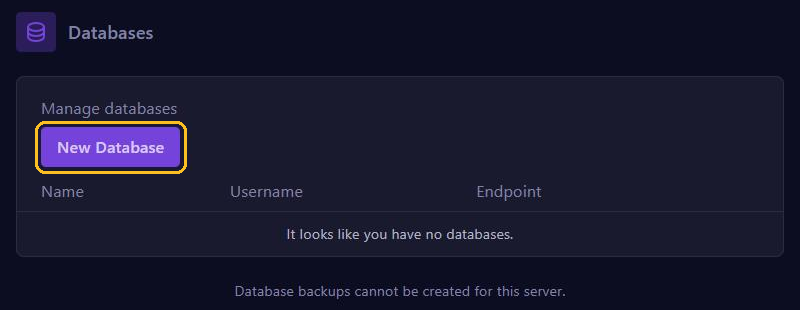
Go to Databases in the menu and click New Database.
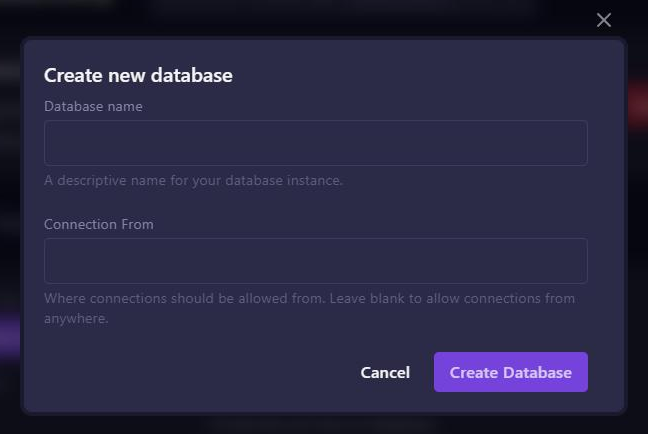
Fill in the window:
- Database name: a name you recognise, for example
luckperms. - Connection From: leave this empty. Then your server can connect, and so can a website or a second server, for example. Only fill something in if you want to limit connections to one IP address.
Click Create Database.
Using the details
The new database then appears in the list, with its name, the username (Username) and the address with the port (Endpoint). Use the Database Details button next to the database to see the password.
Fill these details in your plugin's configuration file, usually plugins/<plugin>/config.yml. For LuckPerms it looks like this:
storage-method: MySQL
data:
  address: <endpoint>
  database: <database name>
  username: <username>
  password: <password>
Then restart your server.
Tips
- Never share your database password. Has it leaked anyway? Create a new password under Database Details.
- A backup of your server contains your files, not your databases. If a plugin uses a database, check whether that plugin has its own export feature.