An address like gnode1.elitestarhosting.com:25616 is hard to remember. With a free subdomain, players connect with something like survival.eshplay.com instead.
Creating a subdomain
- Open your server in the game panel and go to Subdomains.
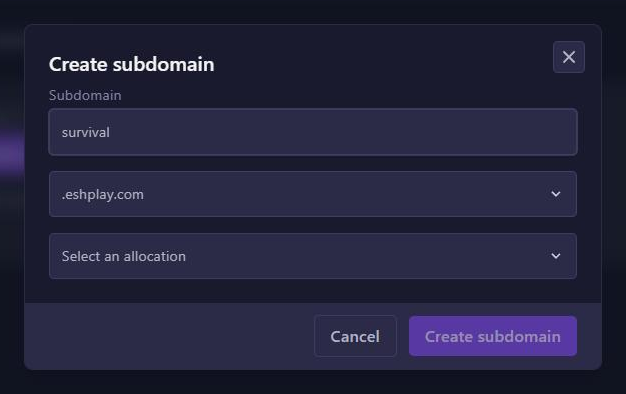
- Click Create subdomain.
- In Subdomain, fill in the name you want, for example
survival. - In Select a domain, choose .eshplay.com.
- In Select an allocation, choose your server's port: the one marked Primary.
- Click Create subdomain.
The subdomain appears in the list. After a few minutes Java players can connect with survival.eshplay.com, without a port. Bedrock players connect with the server address and the port.
Tips
- Name already taken? Pick another one.
- You can delete a subdomain again on the same page.
- Have a domain name of your own? Connect it with an SRV record: see Ports and allocations.