Minecraft
Server Hosting
Minecraft server hosting in the Netherlands with low ping for players in the Netherlands and Belgium. Ryzen 9 9950X, DDR5, DDoS protection and instant setup.
Starting from €2.00 per month
Like the trial? Upgrade it to a plan and keep your server and files.
Choose your plan
Drag the slider to find the right RAM for your server size.

1GB Budget
Like the trial? Upgrade it to a plan and keep your server and files.
What's included?
Ideal for small friend groups and private SMPs with up to 20 players. Perfect for vanilla or lightly modded servers that don't need many plugins or extra resources. All at the lowest possible price.
DDoS Protection
Enterprise-grade mitigation keeps your server online even during attacks.
Instant Setup
Your server is deployed automatically within minutes of ordering.
EliteStarHosting Panel
Manage your server easily with a powerful, feature-rich control panel.
Automatic Backups
Scheduled backups protect your world and player data from accidental loss.
Multiple Server Types
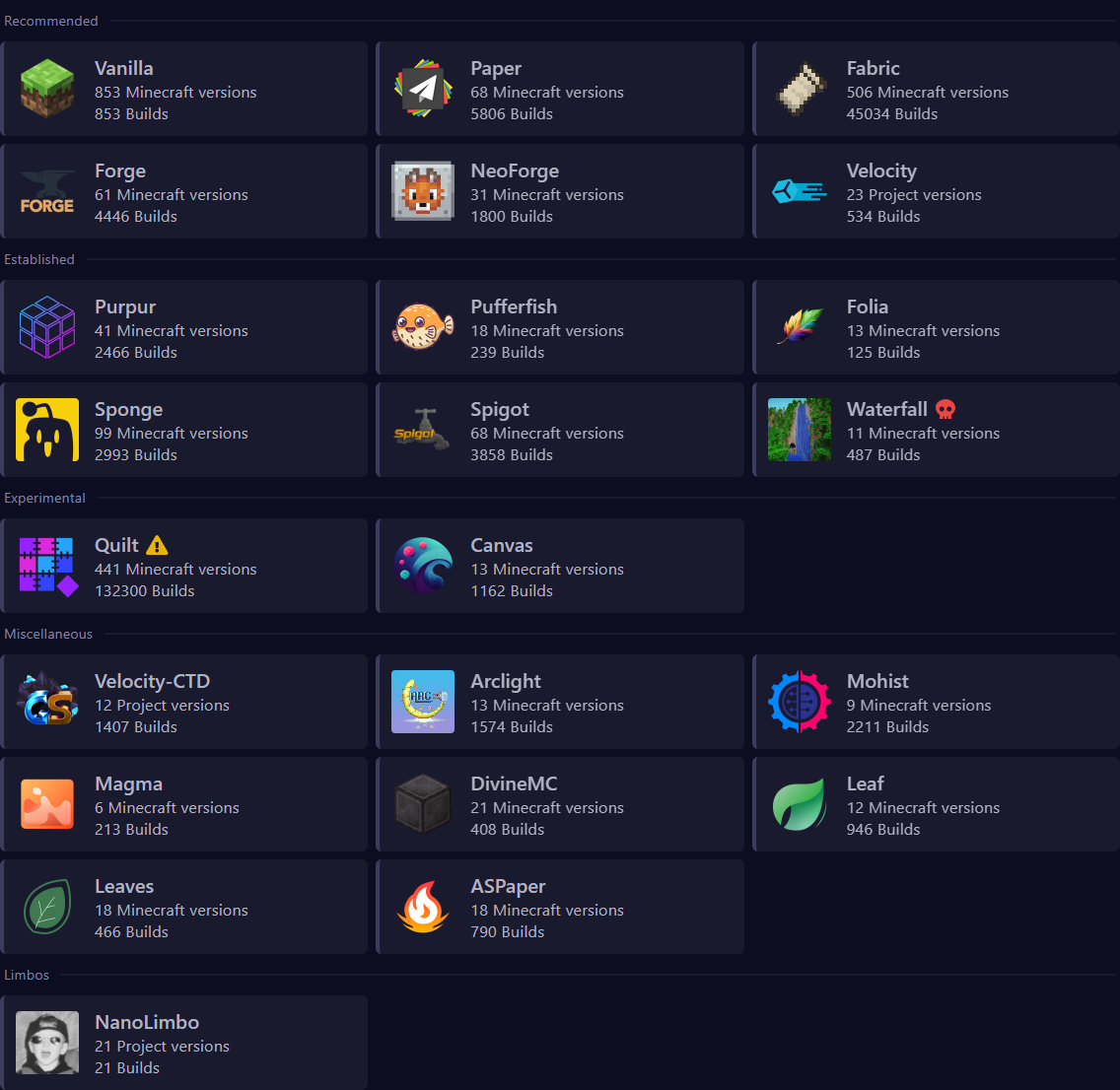
Supports Vanilla, Paper, Fabric, Forge, Spigot and more. Switch with one click.
NVMe SSD Storage
Fast NVMe drives ensure quick chunk loading and low disk latency.
Mod & Plugin Support
Install mods and plugins directly from the panel with no technical knowledge needed.
15/7 Support
Our support team is available 15 hours a day, 7 days a week to help you out.
Find the lag, prove it, fix it
LagCore is our own lag doctor for Minecraft servers and networks. It watches every tick, scans your chunks a few at a time and tells you exactly what is slowing your server down, with the evidence to show for it.
From "it lags" to the exact chunk
Names the cause: which chunk, how many entities or hoppers, and how many milliseconds it costs every tick.
See which plugin costs what
Tick time per plugin, plus a Spark report attached as evidence when the lag keeps coming back.
Fixes you approve
Send a fix from the hub. Anything with risk waits for a person in game to approve it.
No ports, no payloads
One plugin for Paper 1.20+ and forks like Purpur and Folia. It only sends measurements, never chat, commands or IP addresses.
Example finding, not a live server.
Per server. Want it on your server? Contact us and we add LagCore to your Minecraft plan.
Request LagCoreBudget or Premium: which one fits your server?
| Feature | Budget | Premium |
|---|---|---|
| Starting price | €2.00/month | €2.50/month |
| RAM (DDR5) | 1 to 32 GB | 1 to 32 GB |
| CPU cores | 1 to 6 | 4 to 8 |
| NVMe storage | 10 to 80 GB | 20 to 120 GB |
| Ports | 2 to 3 | 3 to 4 |
| Databases | 1 | 2 |
| Backups | 1 to 3 | 7 to 10 |
| Best for | Small SMPs with friends and light plugin use | Public servers, many plugins and large modpacks |
Minecraft server hosting in the Netherlands
With Minecraft server hosting you rent your own server that stays online day and night, so you don't have to host it on your own PC. It runs in Amsterdam, which keeps the ping low for players in the Netherlands and Belgium and in most of Western Europe. Order a plan, pick Paper, Fabric, Forge or a modpack and your server is online within minutes. Unlike free hosts such as Aternos, there is no queue and your server keeps running when everyone has logged off.
Make your own Minecraft server in three steps
Making your own Minecraft server takes three steps. Choose how much RAM you need with the slider above and pick Budget or Premium. Pay with iDEAL, PayPal or a card, without a contract. Within a few minutes your server is online: pick Paper, Fabric, Forge or a modpack in the panel and share your free address, such as yourname.eshplay.com, with your friends.
Why host your Minecraft server with us?
Every Minecraft server runs on an AMD Ryzen 9 9950X with DDR5 RAM and NVMe SSD storage, hosted in the Netherlands. Minecraft runs most of its game logic on a single thread, so fast single-core performance is what keeps your TPS stable as more players join and more plugins load.
You manage everything from our game panel: switch between Vanilla, Paper, Spigot, Fabric and Forge, change your Minecraft version with the version switcher, install plugins with the plugin installer and manage worlds and backups. Your server is online within minutes after payment, DDoS protection is included and there is no contract.
How much RAM does my Minecraft server need?
As a rule of thumb: 2 to 4 GB is enough for a small Vanilla or Paper server with friends, 6 to 8 GB for a public server with plugins, and 10 GB or more for large modpacks. Not sure? Start small and upgrade at any time without losing your world, or try Minecraft hosting free for 24 hours first.
Paper, Fabric, Forge or a modpack?
Paper is the best choice for most servers with plugins: it is fast, compatible with Spigot plugins and fixes many performance problems of Vanilla. Purpur builds on Paper with extra settings. Want mods instead of plugins? Fabric is light and quick to update to new Minecraft versions, Forge and NeoForge run the big modpacks.
You switch between them in the Versions tab of the panel. Make a backup first, because a world does not always convert back after it has run on a modded or newer version.
Java and Bedrock players on one server
With Geyser and Floodgate, players on Bedrock Edition (phones, consoles and Windows) join the same server as Java players. Both are in the plugin installer. Geyser gets its own port: add one in the Network tab, every plan includes at least two ports.
Moving your server to us
Already have a server somewhere else? The Importer in the panel copies your world, plugins and settings straight from your old host over SFTP or FTP. You can also upload a world yourself, or ask us to move it for free. Your server gets a free address like yourname.eshplay.com, so players never need to remember an IP address.
Powerful Server Management
Manage your server from our game panel: console, file manager, backups, schedules, databases and more.
Version Switcher
Build changer to change your minecraft version with ease. In the Version Switcher tab you can always change your version. Please reinstall after changing.
Plugin Installer
World Manager
Backups & Schedules
Database Manager
Guides and articles
Frequently Asked Questions
Common questions about our Minecraft hosting.
Join Our Discord Community
Get quick support, open a ticket and stay updated on new features and deals.