Every FiveM server with us runs txAdmin, the management panel by Cfx.re. It shows who is online, lets you manage resources, kick or ban players and schedule restarts. You can also install QBCore or ESX with it in a few steps.
Opening txAdmin
Click Tx Admin at the top of your server page in the game panel to open txAdmin.
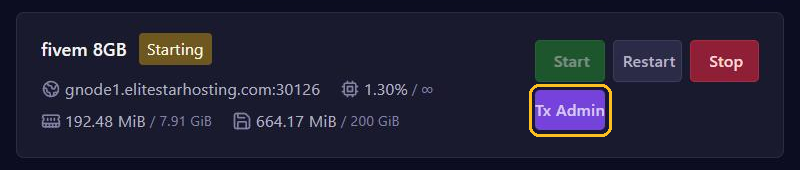
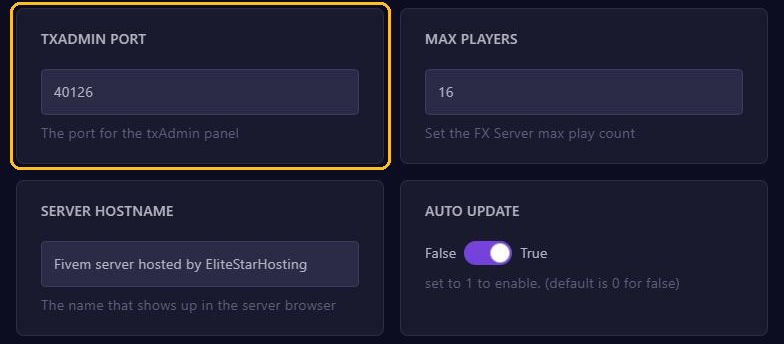
txAdmin runs on a port of its own, which you find under Startup in TXADMIN PORT. So you can also open txAdmin with your server address and that port, for example http://gnode1.elitestarhosting.com:40126.
The first time
- txAdmin asks for a PIN. You find it in your server's console: look for the line with the PIN.
- Link your Cfx.re account and create an admin account.
- Choose how to set up your server. With a recipe, txAdmin installs a complete base such as QBCore or ESX, including the database. Already have server files? Then choose your existing server data.
A recipe needs a database: create one first under Databases and fill in its details when txAdmin asks for them.
What you do in txAdmin
- Dashboard: start, stop and restart your server and see its usage.
- Players: view, warn, kick or ban players.
- Resources: start, stop and restart resources without restarting your whole server.
- Settings: among other things, automatic restarts at fixed times.
When you restart your server through txAdmin, players get a warning first.
Tips
- Don't share your txAdmin login. Give co-admins their own account in txAdmin.
- Lost your txAdmin password? Log in with your Cfx.re account, or get in touch.