Your domain can do more than show your website. With one DNS record you point a subdomain, such as vps.yourdomain.com or play.yourdomain.com, to another server, for example your VPS or game server. Your website and email keep working as before.
Where do you edit your DNS?
That depends on your domain's nameservers, see Connect your domain:
- Domain with web hosting with us: in DirectAdmin under Account Manager > DNS Management, with Add Record.
- Domain with us without web hosting: in the client area. Open your domain and choose DNS Management. There you add A, CNAME, MX, TXT and SRV records.
- DNS somewhere else, for example at Cloudflare: with that provider.
Don't create the subdomain under Subdomain Management in DirectAdmin. That gives you a website on your hosting, with its own record that points to us. For another server, the DNS record alone is enough.
A, AAAA or CNAME?
- A: a name that points to an IPv4 address, such as
203.0.113.10. This is the one you need most. - AAAA: the same for an IPv6 address. Only create one if your server has an IPv6 address.
- CNAME: a name that points to another name, such as
gnode1.elitestarhosting.com. If the address behind that name changes, your subdomain follows by itself. A CNAME may not share its name with any other record, so not on your main domain itself and not next to an A record with the same name.
In DirectAdmin you only fill in the part before your domain as the name, so vps. Put a dot after a value outside your own domain, such as gnode1.elitestarhosting.com.. Without that dot, DirectAdmin appends your own domain.
TTL: how long a record is remembered
The TTL is the number of seconds other servers remember a record. In DirectAdmin you set it under DNS Management. Is your server getting a new IP address soon? Then set the TTL to 300 a day in advance and raise it again afterwards.
Example: your VPS
Add an A record with the name vps and the IP address of your VPS as the value, for example 203.0.113.10. You then connect with ssh [email protected], see Connect to your Linux VPS with SSH.
Running a website on your VPS? It needs its own SSL certificate, because the certificate of your web hosting only works on our web servers. See A website with Nginx and SSL on your VPS.
Example: a game server
Want players to join your Minecraft server via play.yourdomain.com, without a port? The Record Generator on the Network page of the game panel gives you a CNAME and an SRV record, see Ports and allocations.
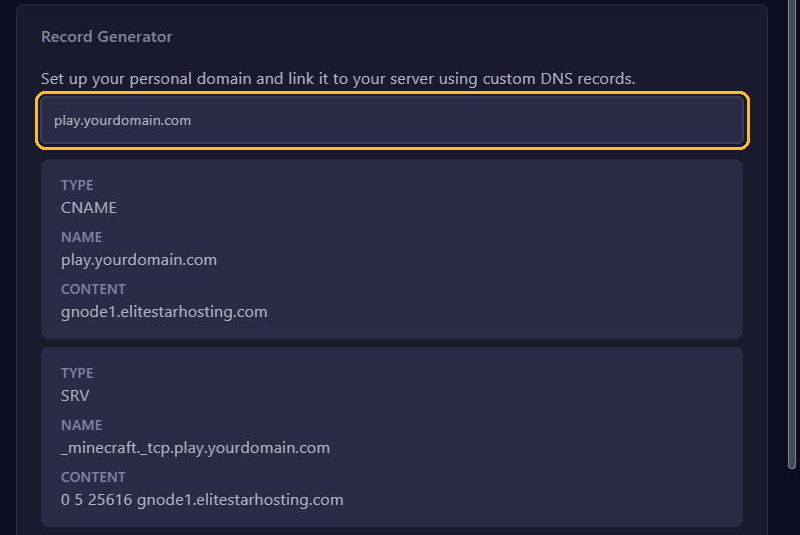
In DirectAdmin you add them with Add Record:
- CNAME: name
playand as the value your node with a dot after it, such asgnode1.elitestarhosting.com.. - SRV: name
_minecraft._tcp.play, priority0, weight5, your own port and as the target your node again, with a dot after it. You can also tick Edit Manually and type the value in one go, such as0 5 25616 gnode1.elitestarhosting.com..
In the client area or at another provider you fill in the same details. Java players then connect with play.yourdomain.com, Bedrock players also add the port. At Cloudflare, set the CNAME record to DNS only (grey cloud). No domain of your own? Then use a free subdomain such as survival.eshplay.com.
Checking with nslookup
Open a command prompt and type:
nslookup vps.yourdomain.com
nslookup -type=srv _minecraft._tcp.play.yourdomain.com
The first shows the IP address, the second the port and the server (svr hostname). Still getting the old answer? Wait until the TTL has passed or type ipconfig /flushdns. At whatsmydns.net you see what servers worldwide see.