With a server resource pack, all your players get the same textures, sounds or models as soon as they join. Minecraft asks players whether they want to download the pack, and you can also make it required.
The pack itself isn't stored on your server. You put it online somewhere with a direct download link and fill in that link in your server's settings.
1. Putting the pack online
You need a link that downloads the .zip file straight away, without a download page in between.
- On MCPacks you upload a pack of up to 95 MB for free and get a link for your server.
- Using Dropbox? Then change
dl=0in the share link todl=1.
A resource pack can be at most 250 MB. The smaller it is, the faster players have it.
2. Calculating the SHA-1
With the SHA-1, Minecraft checks that players get the right file. You calculate it on your own computer, in the folder where the .zip file is:
- Windows: open the command prompt and type
certutil -hashfile pack.zip SHA1. - Mac: open Terminal and type
shasum pack.zip.
You get a code of 40 characters. Copy only that code.
3. Setting it up in Config
- Open your server in the game panel and go to Config.
- Click server.properties and search for
resourcewith Search keys.... - Fill in the download link at
resource-pack. - Fill in the SHA-1 at
resource-pack-sha1. - Click Save and restart your server.
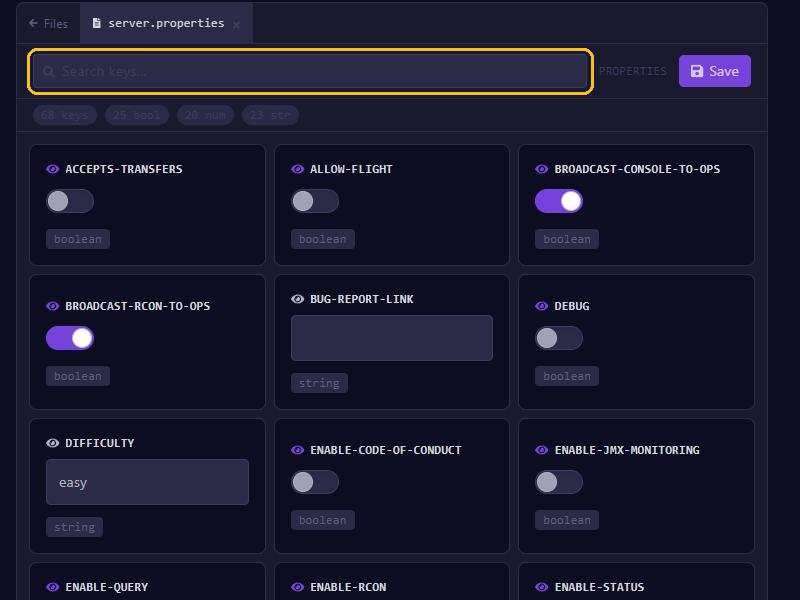
There is more about this tab in Set up server.properties.
Making the pack required
Turn on require-resource-pack if everyone has to use the pack. Anyone who declines it is then removed from the server.
With resource-pack-prompt you give players your own explanation with the download question. You write that text as JSON, for example:
{"text":"This pack belongs to our server"}A new version of your pack
Changed the pack? Put the new file online, calculate the SHA-1 again and fill it in at resource-pack-sha1. Then restart your server. With the old SHA-1, players don't get the new version, or the download fails.
Not working?
- Open the link in a private browser window. A .zip file should download straight away.
- Check that the SHA-1 is exactly right, without spaces.
- Whether the download works doesn't show in your server's console: the player's game keeps track of that.
- A player doesn't get the question? Maybe Server Resource Packs is set to Disabled for your server in their server list. They set it back to Prompt or Enabled with Edit on your server in Multiplayer.