server.properties holds the basic settings of your Minecraft server: the text in the server list, the number of players, the difficulty and more. In the game panel you change them in the Config tab, with switches and input fields instead of a text file.
Changing settings in Config
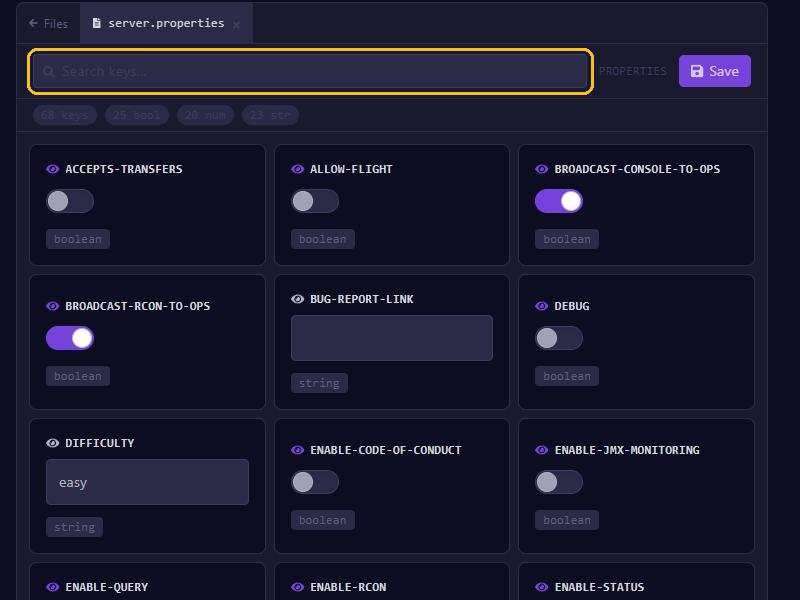
- Open your server in the game panel and go to Config.
- Click server.properties in the list of files.
- Find the setting with Search keys..., for example
motdorplayer. - Change the value. Settings that are on or off are switches; you fill in the rest.
- Click Save and restart your server. The server only reads the new values when it starts.
Prefer working in the text file itself? Then open server.properties in the File Manager.
The most important settings
- motd: the text below your server name in the server list.
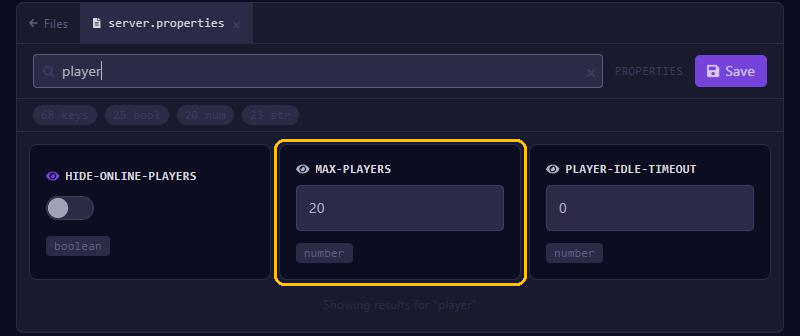
- max-players: how many players can be online at the same time. More players need more memory from your plan.
- difficulty:
peaceful,easy,normalorhard. - gamemode: the game mode for new players:
survival,creative,adventureorspectator. Turn on force-gamemode if everyone should be put in that mode when they join. - hardcore: players become spectators when they die. Preferably choose this for a new world.
- spawn-protection: how many blocks around the spawn point only operators can build or break. 16 by default, 0 turns it off. It only works when there is at least one operator.
- allow-flight: turn this on if players may fly with a mod or plugin. Otherwise the server sometimes kicks them because it thinks they are cheating.
- white-list and enforce-whitelist: only let in players on the whitelist. See Operators, whitelist and bans.
- level-name and level-seed: the name of the world folder and the seed. A seed only works when the server creates a new world.
For view-distance and simulation-distance, see our tips against lag.
online-mode: leave it on
online-mode is on by default. The server then checks with Minecraft that every player has a real account. If you turn it off, anyone can join with any name, including yours or an operator's. Only turn it off when your server sits behind a proxy such as Velocity that already checks the players.
PvP and command blocks
Since Minecraft 1.21.9, PvP and command blocks are no longer in server.properties. They are now game rules, which you change in the console, even while the server is running:
gamerule pvp falseSince 1.21.11 the game rule for command blocks is called command_blocks_work, before that commandBlocksEnabled. If your server runs an older version, you still find pvp and enable-command-block in server.properties.