Do you want your bot to remember things, such as warnings, levels or settings per Discord server? Then put them in a MySQL database. Your bot quickly looks things up or updates them there, and you view everything with HeidiSQL.
1. Create a database
The 512 MB plan has no database, the 1 GB and 2 GB plans have one (November 2026). On 512 MB, upgrade first: your files are kept.
- In the game panel, go to Databases and click New Database.
- Enter for example
botat Database name and leave Connection From empty. - Click Create Database.
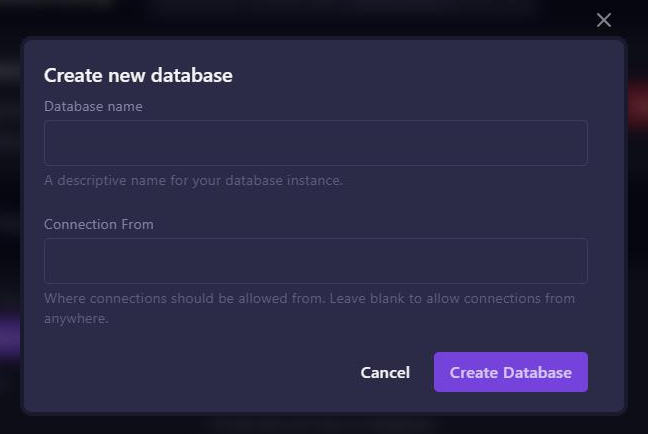
More details: Create a MySQL database.
2. The details in .env
Click Database Details. There you see Endpoint, Username and Password. Your database's name is in the list, such as s1234_bot. Put everything in your .env, below your token. DB_HOST only takes the address, without :3306:
DB_HOST=db1.elitestarhosting.com
DB_USER=u1234_AbCd12EfGh
DB_PASSWORD=your-database-password
DB_NAME=s1234_bot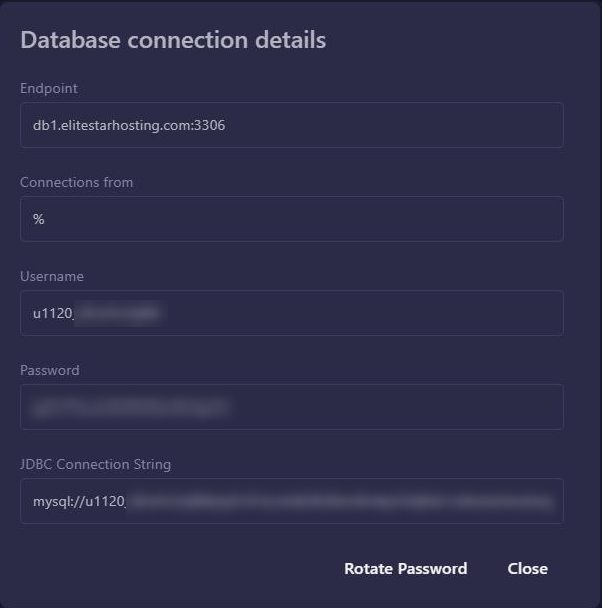
Your .env now holds two secrets. Never share the file and don't put it in Git. Leaked? Click Rotate Password and put the new password in .env.
3. Node.js with mysql2
Run npm install mysql2 on your own computer, so it ends up in your package.json. This bot counts the messages per member:
require('dotenv').config();
const mysql = require('mysql2/promise');
const { Client, Events, GatewayIntentBits } = require('discord.js');

const db = mysql.createPool({
  host: process.env.DB_HOST,
  user: process.env.DB_USER,
  password: process.env.DB_PASSWORD,
  database: process.env.DB_NAME,
});

const client = new Client({
  intents: [GatewayIntentBits.Guilds, GatewayIntentBits.GuildMessages],
});

client.on(Events.MessageCreate, (message) => {
  if (message.author.bot) return;
  db.execute(
    'INSERT INTO message_counts (user_id, total) VALUES (?, 1) ' +
      'ON DUPLICATE KEY UPDATE total = total + 1',
    [message.author.id],
  ).catch(console.error);
});

async function main() {
  await db.query(
    'CREATE TABLE IF NOT EXISTS message_counts (' +
      'user_id VARCHAR(20) PRIMARY KEY, total INT NOT NULL DEFAULT 0)',
  );
  await client.login(process.env.DISCORD_TOKEN);
}

main();
CREATE TABLE IF NOT EXISTS creates the table on the first start and does nothing after that. Always pass values through ? and never paste them into the SQL text: that protects against SQL injection. Discord IDs are too big for a JavaScript number, so you store them as text: VARCHAR(20). Then upload your code as in the guide for Node.js.
4. Python with aiomysql
Put aiomysql in your requirements.txt, next to discord.py and python-dotenv. Our database server runs MariaDB 11.8 (November 2026), and aiomysql works with it without extras.
import os

import aiomysql
import discord
from dotenv import load_dotenv

load_dotenv()

class Bot(discord.Client):
    async def setup_hook(self):
        self.db = await aiomysql.create_pool(
            host=os.getenv("DB_HOST"),
            user=os.getenv("DB_USER"),
            password=os.getenv("DB_PASSWORD"),
            db=os.getenv("DB_NAME"),
            autocommit=True,
        )
        await self.run_sql(
            "CREATE TABLE IF NOT EXISTS message_counts ("
            "user_id VARCHAR(20) PRIMARY KEY, total INT NOT NULL DEFAULT 0)"
        )

    async def run_sql(self, sql, args=None):
        async with self.db.acquire() as conn, conn.cursor() as cur:
            await cur.execute(sql, args)

    async def on_message(self, message):
        if not message.author.bot:
            await self.run_sql(
                "INSERT INTO message_counts (user_id, total) VALUES (%s, 1) "
                "ON DUPLICATE KEY UPDATE total = total + 1",
                (str(message.author.id),),
            )

Bot(intents=discord.Intents.default()).run(os.getenv("DISCORD_TOKEN"))
setup_hook runs once before your bot connects: the right place for the pool. With autocommit=True, aiomysql saves every change straight away. Without it, a change is lost unless you call commit() yourself. Upload your files as in the guide for Python.
5. View it with HeidiSQL
Connect as in Open your database with HeidiSQL. Click your database on the left, then the message_counts table, and open the Data tab. Stop your bot before you change anything there, or it may overwrite your change.
A backup holds your files, not your database. So export it now and then with Export Database or with HeidiSQL.
Not working?
Access denied for user:DB_USERorDB_PASSWORDis wrong, or you filled in Connection From.getaddrinfo ENOTFOUND(Node.js) orCan't connect to MySQL server(Python): checkDB_HOST.