More than 48 players works if three things are right: OneSync, a Cfx.re subscription for the slots and a server that can handle the load.
How many players can you have?
Cfx.re's limits in November 2026:
- Without a subscription: up to 48 players.
- Element Club Argentum ($15 a month plus VAT): up to 64 players.
- Element Club Aurum ($25 a month plus VAT): up to 128 players.
- Element Club Platinum ($50 a month plus VAT): up to 2048 players.
Above 64 players, OneSync must be On. You take out a subscription in the Cfx.re portal under Element Club. The extra slots can take up to 6 hours to work. Then you raise Max Players yourself.
OneSync: On, Legacy or Off
With OneSync, the server keeps track of where players, vehicles and NPCs are. There are three modes:
- On: the server decides which entities each player gets. With Infinity, which is on by default, this goes up to 2048 players. Players and entities more than 424 units away don't exist on a player's PC. Scripts that loop over all players on the client must do that on the server.
- Legacy: a compatibility mode for scripts that expect all players to exist on every PC. Cfx.re advises against it because of performance problems and graphical glitches. At most 64 players.
- Off: no OneSync, players sync with each other as in GTA Online. Only for fewer than 32 players.
On FiveM for GTAV Enhanced, Legacy and Off no longer exist (November 2026).
Checking OneSync
On our servers, txAdmin handles OneSync, set to On (recommended) by default. To check:
- Click Tx Admin at the top of your server page.
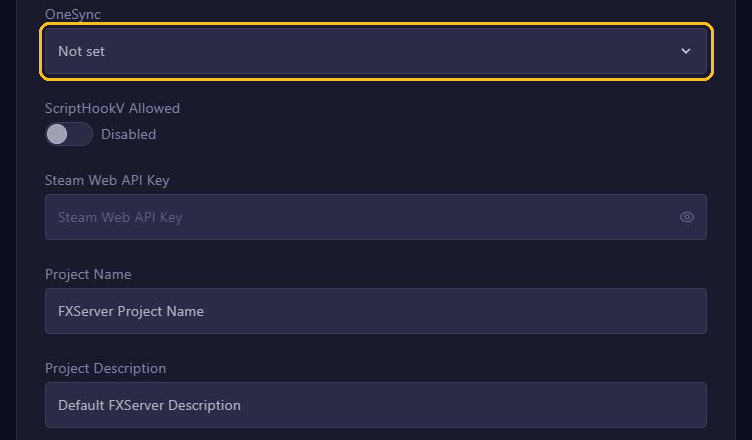
- Go to Settings, tab FXServer, and click Show Advanced.
- Under OneSync, choose On (recommended) and click Save FXServer Settings.
Leave OneSync in the server.cfg editor on Not set: txAdmin turns off any onesync line in your server.cfg at startup anyway. See also Advanced server.cfg settings.
Raising Max Players
- Run a recent FXServer version: Cfx.re asks for that for more than 48 slots. See Update FXServer.
- Go to server.cfg editor, enter the number your subscription allows in Max Players, for example
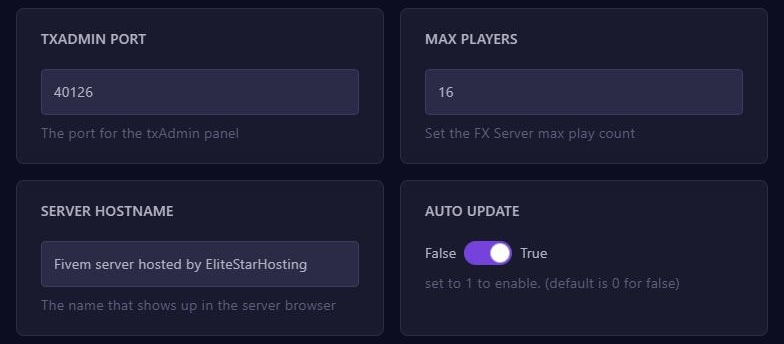
64, and click Save. - Enter the same number under Startup in MAX PLAYERS. On every start, the panel writes that value into your server.cfg.
- Restart your server.
Convars for many players
These convars are in the official list of server commands. Add them with Manual Edit in the server.cfg editor, above your ensure lines, click Save and restart. Manual Edit shows your license key in plain text: don't screenshot it.
set onesync_population false: no NPCs and traffic. The server keeps track of fewer entities, but your city is empty.set onesync_distanceCullVehicles true: vehicles far away and out of view are no longer synced, like other entities by default. Handy with lots of cars.set sv_entityLockdown relaxed: the server refuses entities that scripts create on a player's PC, and withstrictall entities from players. That slows down object spam and cheaters, but scripts that create vehicles on the client stop working. Test this first.
Leave onesync_enableInfinity and onesync_distanceCulling at their default value true: Infinity is needed for large player counts and culling improves performance.
Performance
Every extra player gives your scripts more work.
- Find heavy resources with resmon and the profiler.
- Restart a few times a day with scheduled restarts.
- Our rule of thumb: 8 to 10 GB RAM for 32 to 48 players with many scripts, 12 to 16 GB for a large roleplay community. Our biggest FiveM plan, 16GB Premium, has 8 CPU cores and costs €40 a month (November 2026). You can always upgrade and keep your files.