An MLO is a custom interior: a building players walk into without a loading screen, such as a police station, garage or club. In FiveM, it's a resource like any other: players download its files when they join. For cars, clothing and simple maps, see Add custom cars, maps and clothing.
What's in an MLO?
A version made for FiveM is a folder with an fxmanifest.lua and a stream folder:
my-mlo/
  fxmanifest.lua
stream/ .ymap, .ytyp, .ydr, .ytd and .ybn.ymap: where everything is placed in the world..ytyp: the definition of the interior and its objects..ydrand.ytd: models and textures..ybn: collisions, what you walk on and bump into.
No fxmanifest.lua included? Then use this one from the FiveM documentation. With this_is_a_map, FiveM treats the resource as map data:
fx_version 'cerulean'
game 'gta5'
lua54 'yes'
this_is_a_map 'yes'
Does it already come with an fxmanifest.lua, for example with a data_file 'DLC_ITYP_REQUEST' line? Use that one. Only have a .rpf file? That's usually a version for single player: FiveM doesn't load .rpf files from stream.
Uploading and starting
- Make a backup.
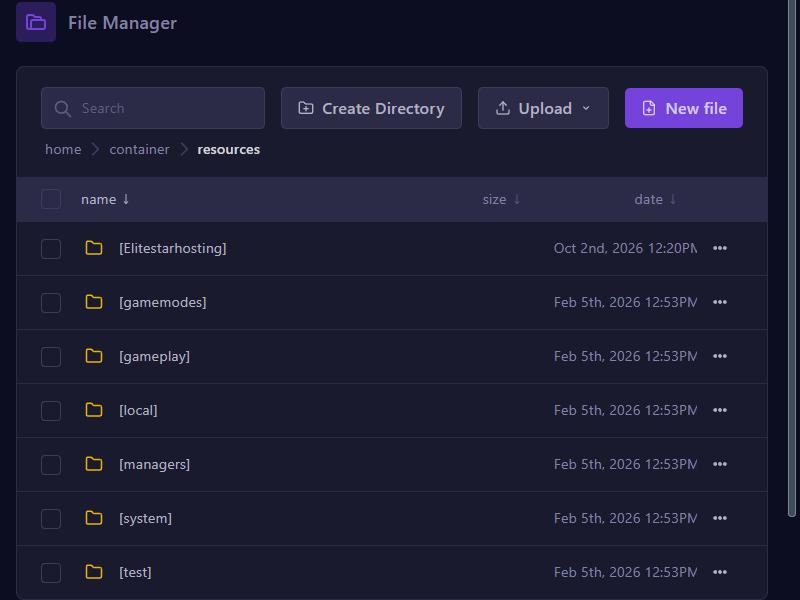
- In the game panel, open Files, go to resources, create a folder
[mlo]with Create Directory and open it. - Upload the folder with Upload and Upload Folders, or with SFTP.
- In the server.cfg editor, type the folder name under Resources, click Add and Save, and restart your server.
Then check the console. A line like Asset my-mlo/... uses 52.0 MiB of physical memory points to a heavy file: above 48 MiB, FiveM warns that models may not load.
Game build and escrow
- Does the description name a minimum game build or a DLC? Set at least that game build, or parts of the interior may be missing.
- A
.fxapfile means the MLO is protected with escrow, which encrypts the models, among other files. Upload the .zip file in one piece and unpack it on the server, as in Get paid FiveM scripts (escrow) working.
GTA interiors with bob74_ipl
GTA V has many interiors and parts of the world that are switched off by default, such as GTA Online apartments and the casino. Scripts switch them on through so-called IPLs. bob74_ipl loads almost all of them and fills holes in the world. The ESX Legacy, QBCore and Qbox recipes put it in resources/[standalone]. Version 2.7.1 (October 2026) goes up to and including The Kortz Center Heist. It only loads interiors from a DLC if your game build includes that DLC.
Finding clashing MLOs
Are two MLOs, or an MLO and a GTA interior, in the same spot? Then you see walls or furniture doubled or flickering, or parts are missing.
Does your MLO's description say it replaces an interior from bob74_ipl? Then open bob74_ipl/client.lua in the File Manager. Each interior has its coordinates next to it. Change true to false, or put -- in front of the line with LoadDefault(). Click Save Content and restart. For the Pillbox hospital:
PillboxHospital.Enable(false)- The same file name: if two packs contain a file with the same name, FiveM uses the one from the resource that starts last. Compare the
streamfolders. - Recipes: Qbox already puts a Pillbox MLO in
resources/[assets]/pillbox, QBCore inresources/[defaultmaps]/hospital_map. Installing another MLO for that spot? Remove that folder first. - Still unclear? Turn MLOs off one at a time: with Manual Edit, put a
#in front of theensureline, click Save and restart. Never share your server.cfg: it contains your license key. As an admin, go to the spot with/tp x y z(ESX, QBCore and Qbox; in Qbox, type/optinfirst).
Old textures after an update? Stop your server and clear the cache.