Many paid FiveM scripts are protected with Cfx.re's Asset Escrow. Part of the code is encrypted, and the script only starts on a server that is allowed to use it. FiveM checks this through your license key: it must be created with the same Cfx.re account you bought the script with on Tebex.
Installing a script you bought
After your purchase you get an email with a download link to the script, usually a .zip file. Upload that file in one piece and only unpack it on the server. That way no encrypted files get damaged.
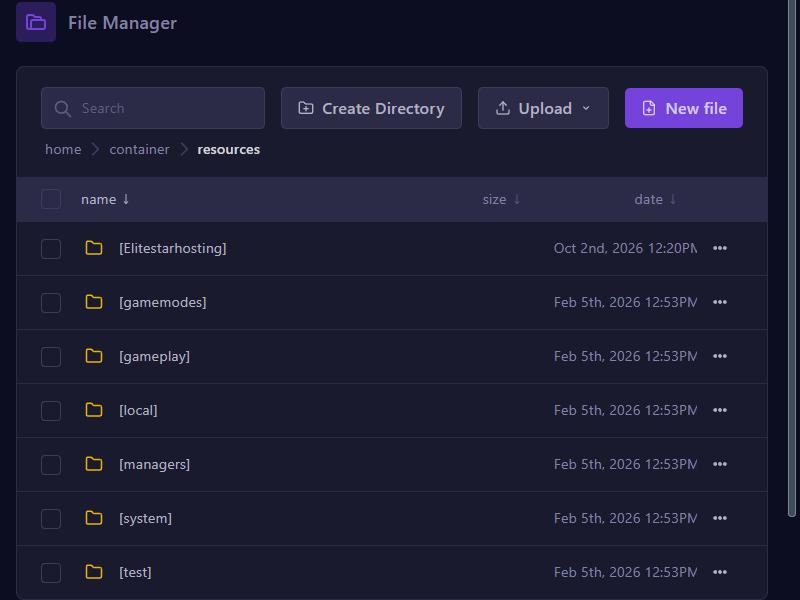
- In the game panel, open Files and go to the resources folder.
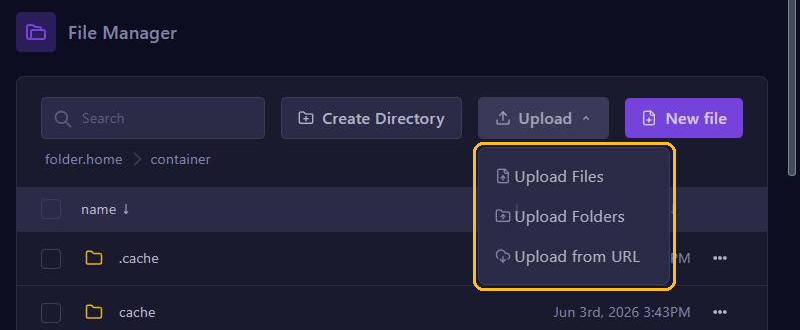
- Click Upload, choose Upload Files and select the .zip file, without unpacking it yourself first.
- Click the three dots ... next to the .zip file and choose Unarchive.
- Check that the script's folder now contains an
fxmanifest.luaand a.fxapfile. Then delete the .zip file. - Start the script as described in Install scripts (resources) and restart your server.
"You lack the required entitlement"
This message in the console means your server isn't allowed to use the script. Check the following:
- The account: your license key must belong to the same Cfx.re account as your purchase. Not the case? Then create a new key with the right account and enter it under License Key in the server.cfg editor.
- The timing: did you just buy the script? Wait half an hour and restart your server.
- A subscription: if the script is part of a subscription that has expired, it no longer starts.
- Someone else's account: did a friend buy the script? Then they first have to transfer it to your account. Often that can only be done once per script.
"Failed to verify protected resource"
Usually the .fxap file is missing from the script's folder, or a file got damaged during the upload. Delete the folder, install the script again from the .zip file as described above and restart your server.
An error while loading the script
Do you see Error parsing script with syntax error near '<\1>' in the console? Then an encrypted file is damaged.
- Did you upload the files one by one, or with a program like FileZilla? That can damage encrypted files. Upload the .zip file and unpack it on the server, or use SFTP with WinSCP.
- Running a very old FXServer version? Install the recommended version through Artifacts.
Linking your Tebex webstore
Want to charge for something on your server, such as a VIP rank? That has to go through Tebex: Cfx.re doesn't allow other payment platforms.
- Create an account at Tebex and create a project. As the type, choose I operate a game server.
- In the Tebex Control Panel, go to Integrations and then Game Servers.
- Click Connect Game Server, choose Plugin, give your server a name and click Continue. Tebex now shows your secret key.
- In the game panel, go to server.cfg editor, click Manual Edit and add a line at the very bottom with
sv_tebexSecret, a space and the key Tebex shows. - Click Save and restart your server.
- Click Continue in Tebex.
Does the Continue button stay greyed out? Then check the console for an error. After that, you finish the steps in Tebex, such as verifying your identity, and Tebex reviews your webstore.
Your Tebex key and your license key are secret. Both are in the text of your server.cfg, so never take a screenshot of it and never share the file, not even with a script developer or on Discord.