Every FiveM server with us already has an in-game menu: the one from txAdmin. vMenu and EasyAdmin are resources you can install next to it.
Is the txAdmin menu enough?
In the game, type /tx in the chat. The txAdmin menu has noclip, teleporting, vehicles, healing and announcements, and lets you freeze, warn, kick and ban players. It works for admins with their own txAdmin account, linked to Cfx.re or Discord.
- Do only your admins need a menu? Then txAdmin is usually enough.
- Want players to pick cars, weapons, clothing, weather and time themselves, as on a freeroam server? Then choose vMenu.
- Want moderators without a txAdmin account, with ACE permissions, a
/reportcommand and a separate ban list? Then choose EasyAdmin.
Install vMenu Enhanced
The old vMenu (3.9.2 and older) no longer gets updates. Its successor is vMenu Enhanced: never run both at once. For a new server without a framework, txAdmin also has a vMenu recipe.
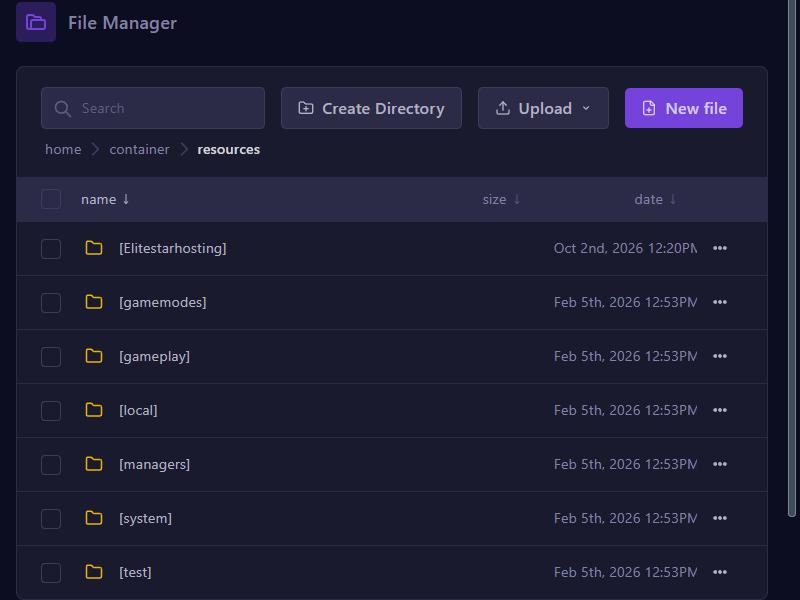
- Download the zip with
Legacyin its name from the vMenu releases page. The other zip is for FiveM Enhanced and won't start on a regular server. - Open Files, go to resources and create the folder
vMenu.Enhancedwith Create Directory, exactly like that. - Open that folder, upload the zip (Upload, Upload Files), click ... next to it and choose Unarchive. Check that
fxmanifest.luais directly insidevMenu.Enhancedand delete the zip. - In the
configfolder, use Copy to copypermissions.cfg.exampleand Rename the copy topermissions.cfg. Do the same withconfiguration.cfg.example. - In the server.cfg editor, click Manual Edit, add these lines at the bottom in this order, click Save and restart your server.
exec @vMenu.Enhanced/config/permissions.cfg
exec @vMenu.Enhanced/config/configuration.cfg
add_filesystem_permission vMenu.Enhanced write vMenu.Enhanced
ensure vMenu.Enhanced
In the game, open vMenu with M.
In permissions.cfg, group.admin gets everything, but regular players (builtin.everyone) can also do a lot, such as weapons and noclip. Put a # in front of lines you don't want, or set vMenu.Enhanced.Admin.StaffOnly to true in configuration.cfg to make vMenu staff only.
Install EasyAdmin
EasyAdmin 8 needs OneSync. txAdmin turns it on by default.
- Download the newest zip from the EasyAdmin releases page.
- In resources, create the folder
EasyAdminwith Create Directory, exactly like that. - Upload the zip into that folder, choose Unarchive and delete the zip.
- In the server.cfg editor, use Manual Edit to add these lines, click Save and restart your server.
ensure EasyAdmin
add_ace group.admin easyadmin allow
add_ace resource.EasyAdmin command allow
Open EasyAdmin with /ea in the chat. The easyadmin permission gives everything, even protection against other admins, so give moderators separate permissions, for example:
add_ace group.moderator easyadmin.player.kick allow
add_ace group.moderator easyadmin.player.warn allow
add_ace group.moderator easyadmin.player.ban.temporary allow
add_ace group.moderator easyadmin.player.ban.view allow
EasyAdmin keeps bans in banlist.json and the data folder: keep them when you update. They are separate from txAdmin's bans.
Who can open the menu?
Both menus work with ACE groups. After a recipe install, your own account is already in group.admin. Add others with add_principal, see Admins and permissions on your FiveM server.
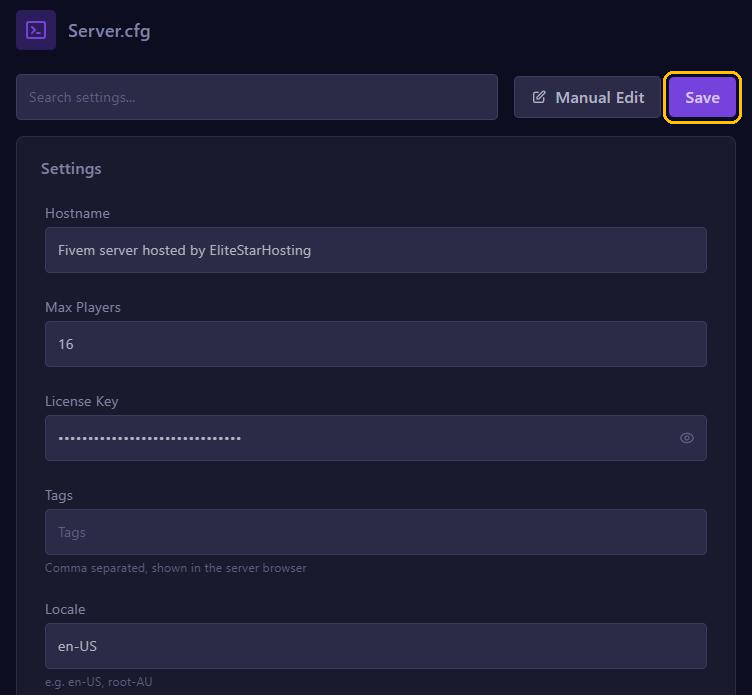
Careful: your server.cfg contains your license key. Never share the file, not even as a screenshot.
Not working?
- Is the folder name exactly right, including capitals:
vMenu.EnhancedorEasyAdmin? - Are the
execlines aboveensure vMenu.Enhanced? - Does vMenu say the net bridge is not answering, or does EasyAdmin not start on an old server version? Update your artifacts.