You manage admin rights on a FiveM server in two places:
- txAdmin: who can log in to txAdmin and what they can do there, such as kicking players or restarting the server.
- ACE permissions in your server.cfg: which commands someone can use in the game, such as your framework's admin commands.
Want to give someone access to the game panel itself? Use subusers.
Co-admins in txAdmin
- Click Tx Admin at the top of your server page to open txAdmin.
- Go to Admins and, on the Admin Manager page, create a separate account for each co-admin.
- Only give the permissions they need. A moderator, for example, only needs to warn, kick and ban players.
Be careful with all permissions at once (all_permissions), managing admins and the server.cfg editor. With that last one, someone can read your server.cfg, which contains your license key.
In-game admin rights with ACE
ACE works with groups. Many server.cfg files already contain lines like these:
add_ace group.admin command allow
add_ace group.admin command.quit deny
add_principal identifier.fivem:1234567 group.admin
The first line gives the group group.admin all commands. The second only forbids quit, which shuts down the server. The third line puts a player in the group. Replace fivem:1234567 with one of that player's identifiers:
fivem:belongs to a Cfx.re account.license:belongs to a Rockstar account.discord:belongs to a Discord account.
Always put identifier. in front, as in the example.
Finding an identifier
In txAdmin, open Players and click the player. The window that opens shows that player's identifiers. Copy one, for example the one that starts with license:.
Adding the lines
- In the game panel, go to server.cfg editor and click Manual Edit.
- Put your
add_principalline below theadd_acelines. Not there yet? Then add the whole example. - Click Save and restart your server.
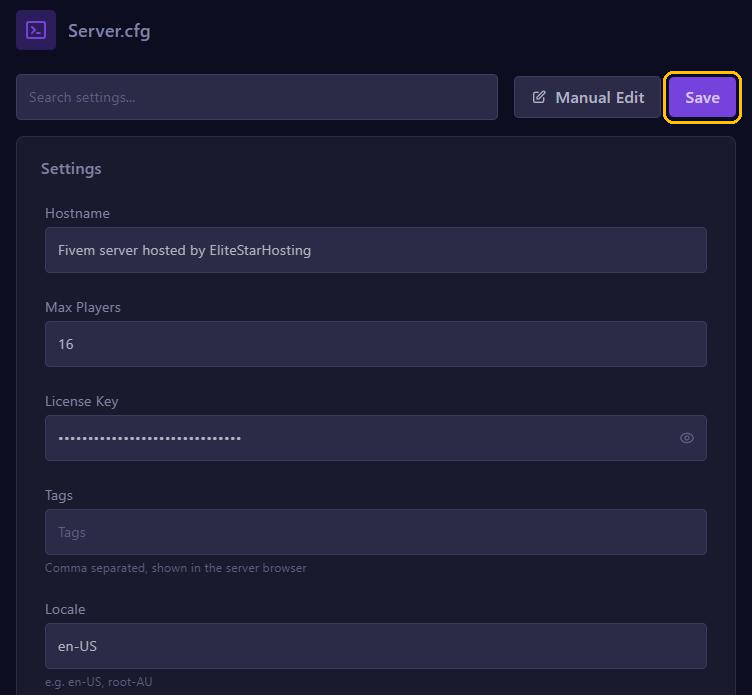
Careful: your server.cfg contains your license key. Never share the file or a screenshot of it, not even for a support question or on Discord.
Did you install your server with a recipe in txAdmin? Then txAdmin has already put your own Cfx.re account in group.admin with an add_principal line like this.
ESX, QBCore and Qbox
- ESX keeps a group for each player, such as
user,adminorowner, and puts the player in the matching ACE group itself when they join. Make someone admin while they are online: typesetgroup 1 adminin the console, with the ID txAdmin shows for the player instead of1. - QBCore uses the groups
qbcore.god,qbcore.adminandqbcore.modin its txAdmin recipe. Put the player in one of them, for example withadd_principal identifier.fivem:1234567 qbcore.admin. - Qbox has the groups
group.admin,group.modandgroup.support, in the filepermissions.cfg. Add a moderator withadd_principal identifier.fivem:1234567 group.mod.
Not working?
- The server.cfg is only read when your server starts, so restart after every change.
- Check the identifier: copied exactly, with
identifier.in front and no spaces. - Type
test_ace identifier.fivem:1234567 commandin the console. The server then shows whether that identifier has access.