ox_inventory is an inventory with slots, weight, shops, storage and weapons as items. ox_target is the "third eye": hold a key and pick what you want to interact with. In November 2026, ox_inventory 2.48.1 and ox_target 1.18.1 are the newest versions by Overextended, with documentation.
Using the Qbox recipe? Then both are already installed, and their settings are in ox.cfg, next to your server.cfg. Skip to "Your own items".
Before you start
- Framework: ox_inventory supports ox_core, ESX Legacy (1.6.0 or newer), Qbox and ND Core. Not QBCore, since August 2024. See ESX, QBCore or Qbox.
- Needed: ox_lib and oxmysql, with a connected database. The ESX Legacy recipe already has both.
- OneSync: txAdmin turns it on by default.
Installing on ESX Legacy
- Make a backup and export your database with Export Database.
- Download
ox_inventory.zipandox_target.zipfrom the newest release of ox_inventory and ox_target. So not Source code. - In the game panel, open Files, go to resources and create a folder
[ox]with Create Directory. - In that folder, upload both files with Upload and Upload Files. For each file, click the three dots ... and choose Unarchive, then delete the .zip files.
- Go to server.cfg editor, click Manual Edit and make sure the lines below are in it, in this order. Click Save and restart your server.
setr inventory:framework "esx"
setr inventory:target true

add_ace resource.ox_lib command.add_ace allow
add_ace resource.ox_lib command.remove_ace allow
add_ace resource.ox_lib command.add_principal allow
add_ace resource.ox_lib command.remove_principal allow

ensure oxmysql
ensure ox_lib
ensure es_extended
ensure ox_target
ensure ox_inventory
ensure oxmysql and ensure es_extended are usually there already, see also Install scripts and edit your server.cfg. This file contains your license key: never share it.
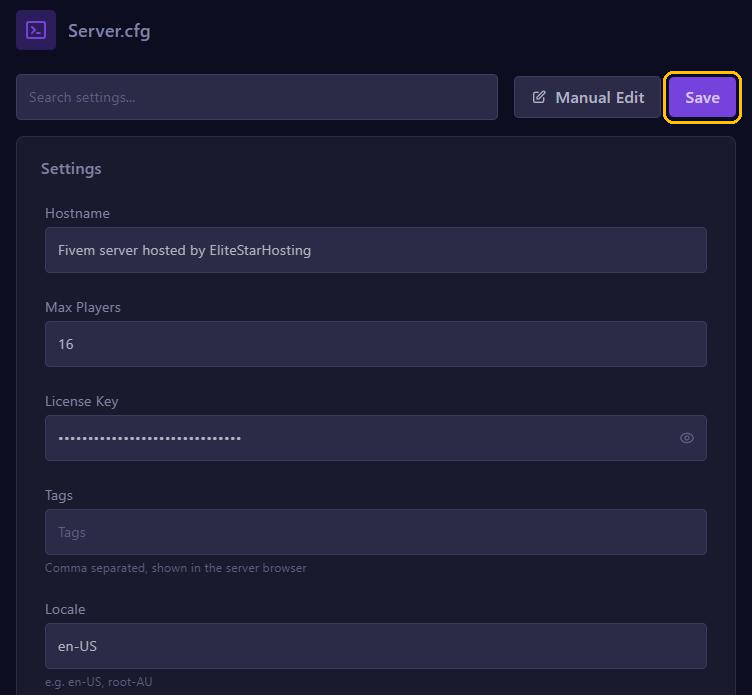
Also delete the folder resources/[core]/esx_inventory, if it's there. With ox_inventory, ESX switches its own inventory off, and that resource then only gives errors. According to the documentation, esx_shops, esx_weaponshop and the storage of esx_policejob don't work with it.
The first start
- ox_inventory creates its table and columns by itself: you don't need to import an SQL file.
- With ESX, ox_inventory copies the items from the
itemstable todata/items.luaand asks for a restart: restart your server. - Already have players? Type
convertinventory esxonce in the console and restart. - Moving from QBCore to Qbox? Since qbx_core 1.24.1 (30 October 2026),
convertqbinventoryconverts the qb-inventory data. Tryconvertqbinventory dryrunfirst; the real conversion needs an empty server.
Your own items
Items are in ox_inventory/data/items.lua. The weight is in grams:
['burger'] = {
    label = 'Burger',
    weight = 220,
    stack = true,
    close = true,
    description = 'Fresh from the grill',
},
The image is a PNG with exactly the item's name in ox_inventory/web/images, so burger.png. Restart your server and test with additem 1 burger 5 in the console.
Settings (convars)
You set up both with setr lines in your server.cfg (with Qbox in ox.cfg), not in their files. Often used:
setr inventory:slots 50andsetr inventory:weight 30000: the number of slots and the maximum weight in grams.setr inventory:keys ["F2", "K", "TAB"]: the keys for your inventory, a second inventory such as a trunk, and the hotbar.setr ox_target:defaultHotkey LMENU: the key for ox_target, left Alt by default.
Replacing qb-target
Since August 2024, ox_target is no longer compatible with qb-target, only with qtarget. So scripts for qb-target need a version or a setting for ox_target: check their documentation. Once no script uses qb-target anymore, remove its ensure line and its folder.
Error messages
UI has not been built: you uploaded the source code. Useox_inventory.zip.ox_target is not loaded - it should start before ox_inventory: putensure ox_targetaboveensure ox_inventory.