Hytale mods run on the server. Players don't need to install anything: according to Hypixel Studios, you can join any modded Hytale server without extra downloads, and Hytale deliberately doesn't support client mods.
Kinds of mods
All mods go in the mods folder of your server. You'll come across two kinds:
- Plugins:
.jarfiles with Java code. They add features, such as commands, minigames or an economy. - Asset packs:
.zipfiles or folders with content, such as blocks, items, NPCs, models and sounds.
Some plugins create a folder of their own in mods, next to their .jar file, with their settings.
Downloading mods safely
Download mods from CurseForge, the mod platform that Hytale's official server manual points to. The mod browser inside Hytale gets its mods from there too. Choose a file made for the Hytale version your server runs.
A plugin is Java code that runs with all the rights of your server. So never install a .jar from an unknown link or a copy on another site.
Installing with Files
- Make a backup and stop your server.
- In the game panel, go to Files and open the
modsfolder. - Click Upload and choose Upload Files for
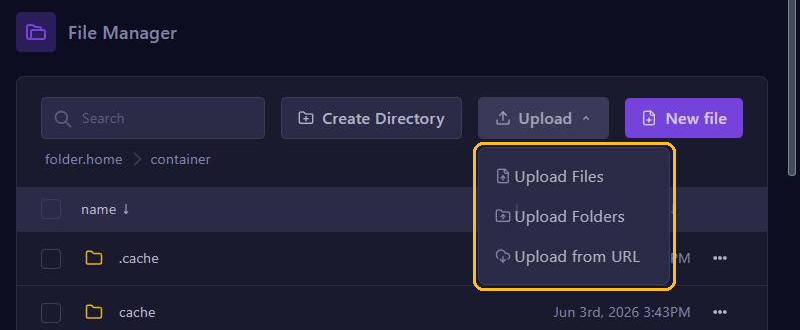
.jarand.zipfiles, or Upload Folders for an asset pack that is a folder. - Start your server and check in the console that the mod loads without errors.
Big files are easier to move over SFTP. Restart your server after every mod you add, update or remove: the server loads mods when it starts.
Turning mods on and off in config.json
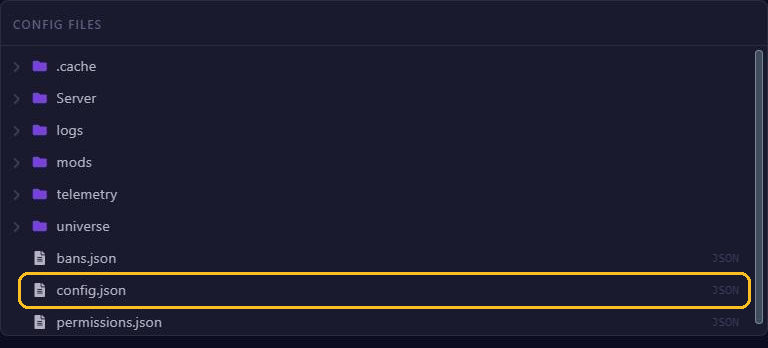
Go to Config (under CONFIGURATION in the menu) and open config.json. Two settings are about mods:
- MODS: a setting of its own for each mod. With
Enabledset tofalse, you turn a mod off without deleting the file. - DEFAULTMODSENABLED: decides whether mods that aren't listed under MODS are switched on by themselves. If this is off, a new mod only loads once you turn it on under MODS.
Stop your server before you change config.json, click Save and start it again afterwards: Hytale reads the file when it starts. You read more about this tab in Set up your Hytale server.
Troubleshooting
- Server stops while starting: a broken or outdated mod can cause this. Read the last lines in the console or the newest file in the
logsfolder; they usually say which mod doesn't load. Take that mod out ofmodsor put a newer version in. - After a Hytale update: big updates can break mods. After Update 6 (August 2026), for example, plugins had to be rebuilt for the new network protocol. Check whether there are new versions of your mods.
- Mod doesn't load: check DEFAULTMODSENABLED and whether the mod is switched on under MODS. Does the mod need other mods? That's usually on the mod page. Install those too.
- Early plugins: some mods are an early plugin. They don't go in
modsbut in a separateearlypluginsfolder, and Hytale itself calls loading them unsupported. Ask us through support first if you want to use one.
Already using a mod in singleplayer? Then it's only on your own PC. Put the same file in the mods folder of your server too.