Plugins add all kinds of things to your Rust server, such as kits, homes or a backpack. For that you choose a modding framework in the game panel: Oxide (also known as uMod) or Carbon. According to its makers, Carbon also runs most Oxide plugins.
Turning on Oxide or Carbon
- Go to Startup and set MODDING FRAMEWORK to
oxideorcarbon. By default it saysvanilla: no plugins. - Restart your server.
- Check with
oxide.version(with Carbonc.version) in the console that it works.
On every start, the server first updates Rust and then fetches the newest Oxide or Carbon. So after a Facepunch update you don't have to install anything yourself.
Do choose up front. Oxide and Carbon can't run together, and Oxide changes Rust files that first have to go back to the originals (see Carbon's porting guide). Want to move from Oxide to Carbon or vanilla? Then open a ticket through support first. Going from Carbon to vanilla simply works with MODDING FRAMEWORK.
Where everything is
After the first start you see an oxide or carbon folder in Files, containing:
plugins: the plugins, as.csfiles.config(with Carbonconfigs): the settings, one.jsonfile per plugin.data: what plugins store, such as homes, plus your groups and permissions inoxide.users.dataandoxide.groups.data.langandlogs: the texts for players and the error messages.
Installing a plugin
- Find a plugin on umod.org and read its description, which lists its commands and permissions.
- Download the
.csfile and don't change its name. - In the panel, go to Files, open
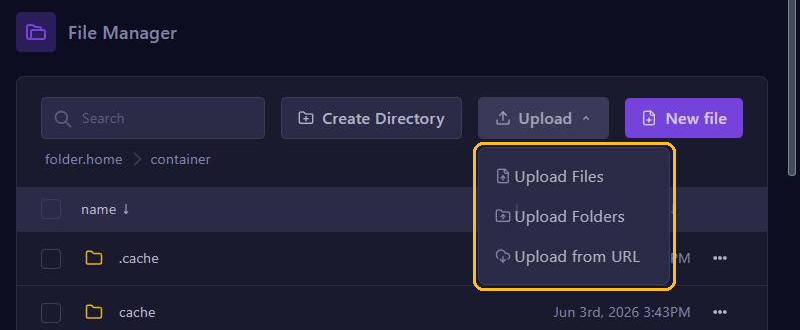
oxide/plugins(orcarbon/plugins), click Upload and choose Upload Files. - Watch the console. Oxide and Carbon notice the new file themselves and load the plugin without a restart.
Plugin not loading? Type oxide.plugins: it also shows why something goes wrong. With oxide.load, oxide.unload or oxide.reload and the file name without .cs you load, stop or reload a plugin yourself. With Carbon these are c.plugins, c.load, c.unload and c.reload.
After changing a config, in the File Manager, reload the plugin with oxide.reload Name. Does the plugin put your old values back? Then first run oxide.unload Name, edit the file and load it again.
Plugins are code: only download them from sources you trust, and make a backup beforehand.
Giving permissions with oxide.grant
Most plugins only do something once a player or group has the right permission. Every player is automatically in the default group. Anyone you make an owner with ownerid also lands in admin (see Rust: make yourself admin).
oxide.grant group default backpacks.use: all players may use a backpack.oxide.grant user Name kits.admin: one player may manage kits.oxide.revoke user Name kits.admin: take that permission away again.oxide.group add vipandoxide.usergroup add Name vip: create a group and put a player in it.oxide.show user Name: see all permissions of a player.
Name with spaces? Put it in quotation marks or use the SteamID64. With Carbon the same works with c. in front, such as c.grant group default backpacks.use.
Four well-known plugins to start with
All four still got updates on umod.org in 2026 (checked on 8 November 2026):
- Kits by k1lly0u: starter kits and kits with a cooldown, managed with
kits.admin. - NTeleportation by nivex:
/sethome,/homeand/tpr, with the permissionsnteleportation.homeandnteleportation.tpr. - Backpacks by WhiteThunder: a backpack with extra space through
/backpack, permissionbackpacks.use. - Furnace Splitter by FastBurst: splits ore evenly over a furnace, permission
furnacesplitter.use.
Planning a wipe? Read Rust: plan wipes with schedules first: some plugin data you want to keep.