On many server lists, players can vote for your Minecraft server. With Votifier, such a list sends every vote to your server straight away, so you can reward players, for example with items or money in the game. This guide uses NuVotifier, the most widely used version. You need a server type with plugins, such as Paper or Purpur.
1. Install NuVotifier
NuVotifier isn't in the panel's plugin list, so you upload it yourself:
- Download
nuvotifier.jarfrom the NuVotifier releases on GitHub. - In the game panel, open Files and go to the plugins folder.
- Click Upload, choose Upload Files and select the file.
- Restart your server. NuVotifier then creates the folder
plugins/Votifier.
There is more about plugins in Install plugins.
2. A port of its own for Votifier
Server lists send votes to a separate port. By default that is 8192, but that port can't be reached from outside on your server. So use an extra port:
- Go to Network, click Create Allocation and write something like Votifier in Notes.
- In Files, open
plugins/Votifier/config.yml. - Put your new port number after
port:, for exampleport: 25617. Leavehostas it is. - Click Save Content and restart your server.
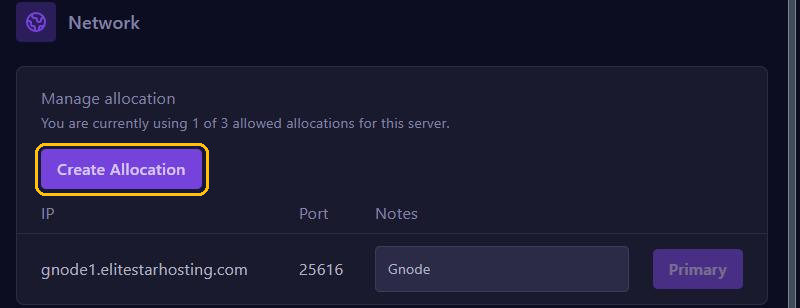
There is more about extra ports in Ports and allocations.
3. Add your server to a server list
On the server list, fill in your server's Votifier details:
- Address: your server address without the port, for example
gnode1.elitestarhosting.com. - Votifier port: the port from step 2.
- Public key: the full contents of
plugins/Votifier/rsa/public.key. Open the file in Files and copy everything.
Does the list ask for a token (NuVotifier v2)? You find it in plugins/Votifier/config.yml, after default: under tokens:. Never share the private.key file from the rsa folder.
4. Rewarding players
Votifier only receives the votes. To give players something for voting, you need a reward plugin, such as VotingPlugin from SpigotMC. You upload it the same way. You set the rewards in that plugin's settings.
5. Test with a test vote
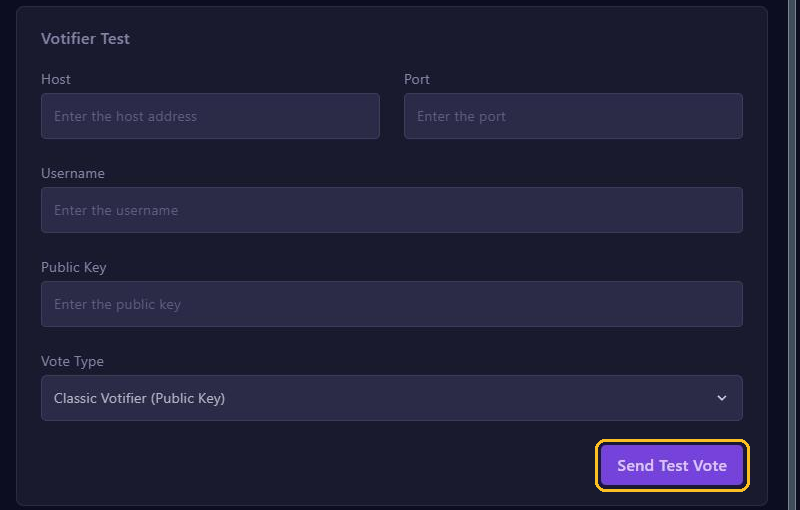
Go to Votifer in the menu (that's how the panel spells it) and fill in under Votifier Test:
- Host and Port: your server address and the Votifier port.
- Username: the name of the player who gets the vote, for example your own.
- Public Key: the contents of
public.key, or your token for NuVotifier v2. - Vote Type: NuVotifier (Public Key), or NuVotifier v2 (Token/Key) if you use a token.
Click Send Test Vote. Does the player get the reward from your reward plugin? Then everything works.
Not working?
- Check that
config.ymlhas exactly the port you created under Network, and that you restarted afterwards. - Copy the public key again, all of it and without extra spaces.
- Check the console for a Votifier error while the server starts.