How fast players level up, catch Pals and gather materials on your Palworld server is set with rates in PalWorldSettings.ini. This guide explains those settings and gives an example for a relaxed server. Name, passwords and other game rules are covered in Set up your Palworld server.
Changing a rate
- Stop your server. If you edit the file while the server is running, your changes get lost.
- Go to Files and open
Pal/Saved/Config/LinuxServer/PalWorldSettings.ini. - Look up the setting in the long line that starts with
OptionSettings=(and only change the number after the=. - Click Save Content and start your server.
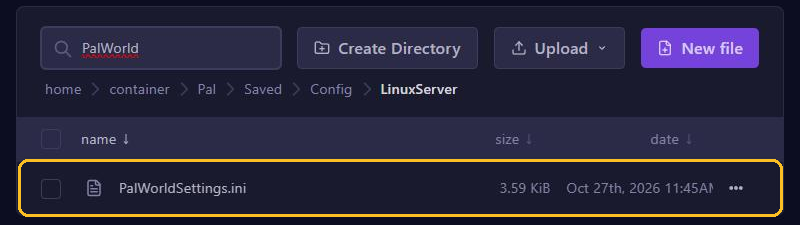
The file also contains your server password and admin password. So don't share it, and don't share a screenshot of it either.
The rates at a glance
These descriptions come from Pocketpair's official server guide, version 1.0.4 (November 2026):
ExpRate: how much experience you get.PalCaptureRate: the chance that you catch a Pal.PalSpawnNumRate: how many Pals appear in the world. A higher value puts more load on your server.EnemyDropItemRate: how many items defeated Pals and enemies drop.CollectionDropRate: how many materials you get from trees, rocks and other things you gather.CollectionObjectHpRate: how much health those trees and rocks have. Lower means they break sooner.CollectionObjectRespawnSpeedRate: how long it takes before they come back. Lower means sooner.PalEggDefaultHatchingTime: how many hours a Huge Egg needs to hatch. Other eggs need time too.MonsterFarmActionSpeedRate: how fast Pals on a Ranch produce items.
Except for the hatching time, these are multipliers: 1.000000 is normal and 2.000000 is double. The official guide gives no minimum or maximum, so change them in small steps. Your server's default values are in DefaultPalWorldSettings.ini in the main folder. Only read that file: the server doesn't use it.
Since Palworld 1.0 (July 2026), the default world settings of a dedicated server closely match Normal difficulty in single player. In 1.0, Pocketpair also made Pals easier to catch overall, so start with a small step for PalCaptureRate.
Example: a relaxed server
These values double experience, drops and materials, make Pals a little easier to catch and let trees and rocks come back in half the time:
ExpRate=2.000000
PalCaptureRate=1.500000
EnemyDropItemRate=2.000000
CollectionDropRate=2.000000
CollectionObjectRespawnSpeedRate=0.500000
These are not separate lines in the file. Look up each setting in the long line and only change its number. Want eggs to hatch faster? Halve the number after PalEggDefaultHatchingTime. Leave PalSpawnNumRate as it is when many players are online.
Your changes do nothing?
Did you upload a world from co-op or single player? Then the world folder may contain a WorldOption.sav. That file holds the settings of your own game, and as long as it's there, the server ignores PalWorldSettings.ini.
- Stop your server and make a backup.
- Go to Files and open your world's folder in
Pal/Saved/SaveGames/0. - Delete
WorldOption.savand start your server.
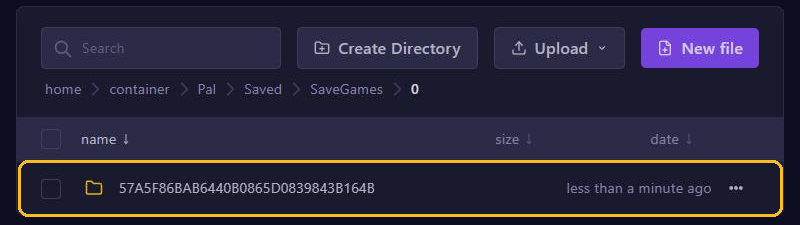
From then on, your server uses the rates from PalWorldSettings.ini. You read more about moving a world in Move your Palworld world from co-op to your own server.