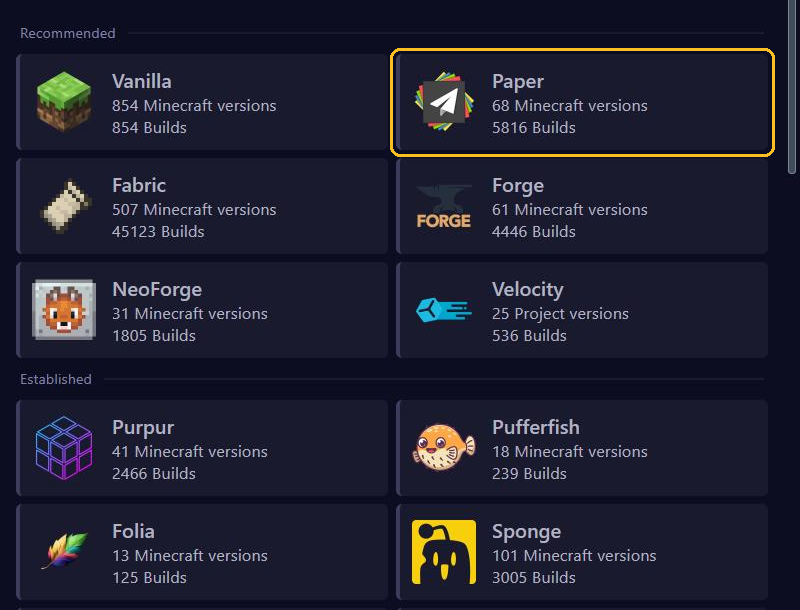
Under Versions you don't only choose a Minecraft version, but also a server type. That decides whether you can use plugins or mods. Below you read what each type does and which type fits your plans.
Plugins or mods: pick one
- Plugins only run on the server. Players join with a normal Minecraft, without installing anything themselves. Think of ranks, minigames, an economy or protection against griefing.
- Mods change the game itself, with new blocks, items, mobs or dimensions. Players then need the same mods in their own Minecraft.
Plugins and mods don't mix. Some server types try to combine both, but the makers of Paper strongly advise against them: many plugins and mods don't work well on them.
The server types
For plugins
- Paper: the best choice for most servers. Fast, stable and suitable for almost all plugins, including those for Spigot and Bukkit.
- Purpur: based on Paper, with extra settings and gameplay options. Plugins for Paper work on it too.
- Folia: a version of Paper that spreads the world over several processor cores, for very large servers. Only plugins their maker has made suitable for Folia work on it. Only choose it if you know why.
For mods
- Fabric: light and often the first to be updated after a new Minecraft version. Popular for optimisation mods and smaller modpacks. Most mods also need the Fabric API mod.
- NeoForge: for big modpacks. Many new modpacks use NeoForge.
- Forge: the older platform NeoForge grew out of. Needed for older modpacks.
Other
- Vanilla: Minecraft exactly as Mojang makes it, without plugins or mods. Datapacks do work, see Install datapacks.
- Velocity: not a normal server, but a proxy that links several servers into one network. Players then switch between, for example, a lobby and a survival world.
The list also shows Pufferfish and Sponge. Those are meant for special situations. If you have no reason to pick them, go with Paper.
What suits you?
- A server with friends and a few handy plugins: Paper.
- A public server with ranks, an economy and protection: Paper or Purpur, with plugins such as LuckPerms.
- A modpack such as All the Mods: the type the modpack names, usually NeoForge. You install modpacks through Modpacks, see Install mods, modpacks and worlds.
- A few mods that make the game faster or prettier: Fabric.
- Several servers under one address: Velocity with Paper servers behind it.
- Pure Minecraft, without extras: Vanilla.
Already have a world and want to switch type? Then first read Switch server type without losing your world.