With WorldEdit you build in a few commands what takes hours by hand: fill an area, replace blocks or copy a whole building. You can also save builds as a schematic and place them again later, even on another server.
WorldEdit works as a plugin on Paper and Purpur, and as a mod on Fabric and NeoForge.
Install WorldEdit
- Open your server in the game panel and go to Plugins.
- Search for
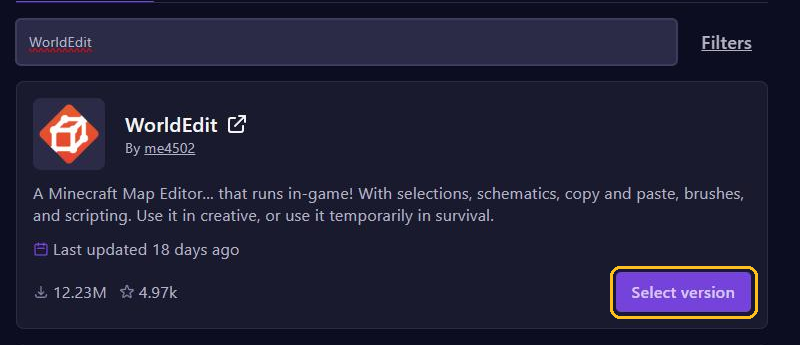
WorldEditand click Select version on WorldEdit by me4502. - Pick a paper version for your Minecraft version, click Install plugin and restart your server.
You need operator rights, or the worldedit.* permission through LuckPerms. On Fabric and NeoForge, only operators can use WorldEdit.
Using FastAsyncWorldEdit (FAWE)? It replaces WorldEdit, so never install both.
Select an area
- Type
//wand. You get a wooden axe. - Left-click one corner and right-click the opposite corner. Or stand on a corner and type
//pos1and//pos2.
Handy commands
//set stone: fills the selection with stone.//set airempties it.//set stone,glass: a mix of stone and glass.//replace dirt grass_block: replaces all dirt with grass blocks.//expand 10 up: makes your selection ten blocks taller.//undo: undoes your last action.//undo 5undoes the last five.
One wrong command changes thousands of blocks at once. So make a backup before you start on something big.
Copy, rotate and paste
- Select the building and stand where you want to paste from, for example in front of the door.
- Type
//copy. - Walk to the new spot and type
//paste.
WorldEdit remembers where you stood when you copied. That's why the building ends up in the same spot relative to you. Want to rotate it first? Type //rotate 90 before you paste. With //paste -a, WorldEdit doesn't paste air, so the landscape around the building stays in place.
Save and load schematics
//schem save house: saves what you copied with//copyashouse.schem.//schem list: shows all your schematics.//schem load house: loads the schematic. Then paste it with//paste.
WorldEdit keeps schematics in the plugins/WorldEdit/schematics folder. That folder only exists once you save your first schematic in the game.
Upload a schematic of your own
Downloaded a schematic, for example a ready-made lobby?
- In the panel, open Files and go to the
plugins/WorldEditfolder. - If there is no
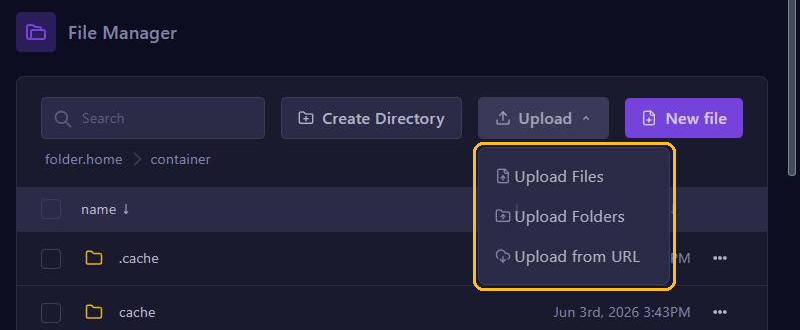
schematicsfolder yet, create it with Create Directory. - Open the folder, click Upload and choose Upload Files.
- In the game, type
//schem loadwith the file name, then//paste.
Use .schem files. WorldEdit can still load old .schematic files from before Minecraft 1.13, but no longer save them. On Fabric and NeoForge the folder is config/worldedit/schematics. Big files are easier to upload over SFTP.
Want to protect what you built as well? Read Protect your spawn and builds with WorldGuard.