Your FiveM server is running, but nobody can find it or join it? Work through this checklist from top to bottom.
1. Is your server running?
Open your server in the game panel and check the status next to its name. Does it say Starting or Offline, or does your server keep restarting? Then open the console and click Error to see only the error messages.
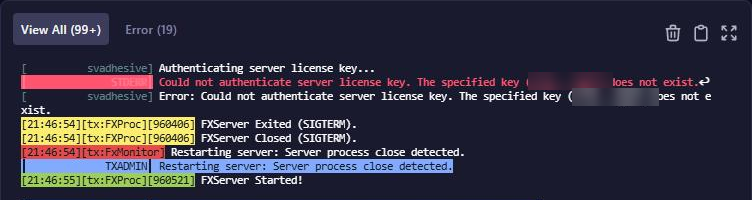
Do you see Could not authenticate server license key? Then create a new license key, as in Set up your FiveM server.
2. Connect directly
Test whether your server can be reached outside the server list:
- Copy the address with the port shown below your server's name, for example
gnode1.elitestarhosting.com:30126. - Open FiveM, press F8 and type
connectfollowed by your address, likeconnect gnode1.elitestarhosting.com:30126.
Did you get in? Then the problem is in the server list: go to step 3. Didn't work? Then open http://gnode1.elitestarhosting.com:30126/info.json in your browser, with your own address. If you see details about your server, it can be reached and the problem is further down. Seeing nothing while the status says Online? Then get in touch with us.
3. Your server isn't in the list
- Give it a moment: after starting, it can take up to 8 minutes before your server shows up in the list.
- Does your server show up as Missing server data (must be configured in Portal)? Since 21 October 2026 you set the name, tags and images in the Cfx.re portal. See Your server in the FiveM server list.
- Is the connect button disabled? Then a line
sv_master1 ""without a#in front makes your server private. - Does your server.cfg contain
sv_lan true? Then your server stays out of the public list.
Found one of those lines? Go to server.cfg editor, click Manual Edit, put a # in front of the line, click Save and restart your server.
4. A message about an outdated server
Do players get a message about end of support (EOS) or end of life (EOL) when they join? Then your server runs an old version of FXServer.
- Gray EOS message: players can still join, but update your server soon.
- Red EOL message: players can't connect until you update.
An unsupported version older than three months can't be joined from the server list either. Install Latest Recommended under Artifacts, as in Update FXServer.

5. Game build errors
- You mostly see
Client/Server game build revision mismatchright after a FiveM update. Update your artifacts; the error usually goes away after that. - Are players missing cars or clothing from a DLC, or do scripts give an error about a native? Then your server is on a build that is too old. See Set the game build and DLCs.
6. Did it work before?
Did it go wrong after a change? Then remove the resource you added last under Resources in the server.cfg editor, click Save and restart. Also check lines you added with Manual Edit, for example that every quote mark has a partner.
Is your server full? Then raise Max Players. More than 32 players also need OneSync, which txAdmin turns on by default (Settings, tab FXServer).
For players: clearing the FiveM cache
Can one player not join, while everyone else gets in? Then have them clear the FiveM cache:
- Close FiveM completely.
- Press the Windows key + R, type
%localappdata%\FiveM\FiveM.app\dataand press Enter. - Delete the folders
cache,server-cacheandserver-cache-priv. Leavegame-storagealone. - Start FiveM and connect again.