Is your network already running as in A Minecraft network with Velocity? Then this is where you add a lobby and minigames.
What does each server do?
- Proxy (Velocity): the address players connect to. It has no world and only passes players on.
- Lobby (Paper): everyone arrives here and picks a game.
- Minigame servers (Paper): one server per game, each with its own minigame plugin. If one restarts, the lobby doesn't notice.
Each one is a separate server in the panel, with its own memory and plugins.
Setting up the lobby
On the lobby, under Config, set in server.properties:
- gamemode to
adventureand force-gamemode on. Players then can't break or place blocks, but can use buttons and levers. They also always appear exactly on the spawn point. - difficulty to
peaceful: no monsters, and hunger doesn't go down.
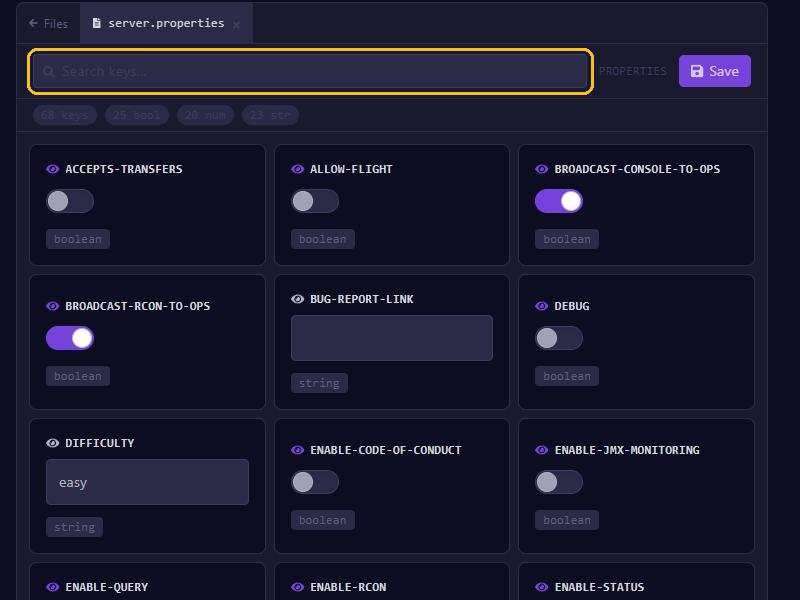
Then type in the console:
time set day
gamerule advance_time false
gamerule advance_weather false
gamerule fall_damage false
These names apply from 1.21.11, see game rules. In the game, stand on the spawn and type /setworldspawn. You create areas with their own rules with WorldGuard.
Linking the minigame servers
- Set up every minigame server as a backend, as in step 3 of the Velocity guide. Never share
forwarding.secret. - Add it to
velocity.tomlunder[servers], but not totry. - Click Save Content and restart the proxy.
[servers]
lobby = "gnode1.elitestarhosting.com:25616"
bedwars = "gnode1.elitestarhosting.com:25618"

try = [
    "lobby"
]
try decides where players arrive and where they go when a server kicks them, for example a minigame server that restarts after a round. With only the lobby in try, everyone ends up back in the lobby.
Forced hosts: straight to a game
With [forced-hosts], an address of your own takes players straight to one server. Velocity looks at the hostname Minecraft sends along. With an SRV record, that is the target of that record, not what the player typed. So with your own domain, create:
- a CNAME
fh-bedwars.yourdomain.compointing to the proxy's node, such asgnode1.elitestarhosting.com; - an SRV record for
bedwars.yourdomain.comwithfh-bedwars.yourdomain.comas its target and the proxy's port.
[forced-hosts]
"fh-bedwars.yourdomain.com" = ["bedwars"]
Anyone who connects with bedwars.yourdomain.com lands straight in BedWars. More about records: Ports and allocations.
Switching servers
/server bedwarsis built into Velocity.- A menu with DeluxeMenus: an item with
[connect] bedwars. - An NPC with Citizens:
/npc command add -p server bedwars.
The menu and the NPC send a BungeeCord message to the proxy. Velocity accepts it as long as velocity.toml has bungee-plugin-message-channel = true (the default).
For a menu, add a line games: under gui_menus: in plugins/DeluxeMenus/config.yml, with file: games.yml below it. Then create plugins/DeluxeMenus/gui_menus/games.yml:
menu_title: 'Choose a game'
open_command: games
size: 9
items:
  'bedwars':
    material: RED_BED
    slot: 4
    display_name: '&cBedWars'
    click_commands:
      - '[connect] bedwars'
Type /dm reload. Players open the menu with /games.
Plugins worth a look (November 2026)
- DeluxeMenus by HelpChat: menus, such as a server selector. Version 1.14.1 works up to and including 26.3.
- Citizens: NPCs. Upload it yourself, see Holograms and NPCs.
- velocity-hub-command:
/huband/lobbyon the proxy. Upload the .jar file to the proxy's plugins folder and sethubServerNametolobbyinplugins/velocity-hub/config.json. - Screaming BedWars: BedWars and variants such as EggWars. In
plugins/BedWars/config.yml, underbungee:, setenabledtotrueand put your lobby atserver. Players then go back after a match. Version 0.2.44 works up to and including 26.3. - RealSkywars: SkyWars, solo and in teams. Needs WorldEdit. Version 1.3 works up to and including 26.3.
- Parkour by A5H73Y: parkour courses with leaderboards and rewards, fun in the lobby itself. Version 7.2.8 works up to and including 26.2.
Bedrock players? Then install Geyser only on the proxy, as Geyser-Velocity. You show player counts per server in your menu with PlaceholderAPI.