All the Mods 10 (ATM10) is one of the biggest modpacks: around 500 mods, lots of quests and a proper endgame. A pack like this asks much more of your server than Paper with a few plugins.
What ATM10 needs
On 8 November 2026, 8.5 is the newest version, released on 4 November. It runs on:
- Minecraft 1.21.1, so not on 26.x;
- NeoForge;
- Java 21.
There is also ATM11 already, but in November 2026 it is listed as an early alpha for Minecraft 26.1.2.
How much RAM?
The ATM team asks for at least 6 GB for most of its packs. The official ATM10 server files start the server with 4 GB and let it use up to 8 GB. For big modpacks we recommend 10 to 16 GB, see How much RAM does your game server need? In our panel the memory follows your plan automatically.
More players, chunk loaders and big factories need more memory. You are running short when:
- the console shows
Out of memory: trueafter a crash, or you seeOutOfMemoryErrorin the log; - the memory on the Console page sits at the maximum all the time. ATM10 8.5 includes spark, so
spark healthin the console shows it too.
Is the memory not full, but your server still falls behind? Then more RAM won't help. Read our tips against lag instead.
Installing through Modpacks
- Make a backup. Is your server on 26.x now? That world won't load on 1.21.1, so start with a new world.
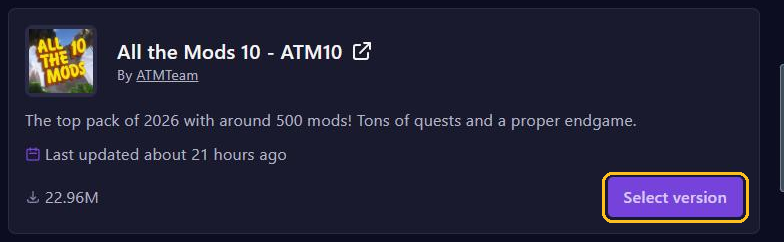
- In the game panel, go to Modpacks, click Filters and choose Curseforge under Platform: ATM10 is only on CurseForge. Then search for
All the Mods 10. - Click Select version on All the Mods 10 itself, so not on a variant such as To the Sky or Lite. Pick the newest version and install it.
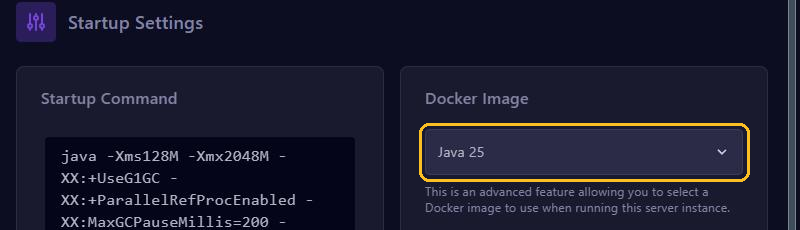
- Under Startup, choose Java 21 at Docker Image. Also see Startup settings.
The first start
Start your server and follow the console. The first start takes much longer than usual: hundreds of mods load and the world is created. If the console asks about the EULA, click I Accept.
Then, in Config under server.properties, copy the values that the ATM team's own server files set. Find them with Search keys...:
allow-flighton. ATM10 has jetpacks, and otherwise the server may kick players who fly.max-tick-timeat180000. The server then waits 3 minutes instead of 1 before it treats a stuck tick as a crash and stops.view-distanceat8andsimulation-distanceat5.
Click Save and restart. You read more about this tab in Set up server.properties.
What players need
Players need Minecraft Java Edition, with ATM10 in exactly the same version as your server. They install it with the CurseForge app, or with Prism Launcher, which can install CurseForge modpacks too. The ATM team advises giving the game 8 GB of memory in the launcher, and no more than 12 GB. Can't someone get in because of missing or mismatched mods? Then see Keep your modded Minecraft server healthy.
Other big packs
This is how other packs from the ATM team stand in November 2026:
- All the Mods 10: To the Sky (skyblock): 1.21.1, NeoForge, Java 21. Before the first start, set
level-typetoskyblockbuilder:skyblock, as its own server files do. - All the Mons (ATM10 with Cobblemon): 1.21.1, NeoForge, Java 21.
- All the Mods 9: 1.20.1, Forge, Java 17.
- All the Mods 11: 26.1.2, NeoForge, Java 25. This pack is still in an early test phase (0.14.0-beta), so expect bugs and many updates.
The server files of ATM9, ATM11 and All the Mons also count on 4 to 8 GB.
And after that?
An update or an extra mod? Then follow the steps in Keep your modded Minecraft server healthy. You read more about the tabs in Install mods, modpacks and worlds. Less lag when players explore new land? Pre-generate your world with Chunky. On ATM10 you install Chunky through Mods, in the NeoForge version for 1.21.1.