If someone plays on a different Minecraft version than your server, they get a message such as Outdated client or Incompatible client and can't get in. With ViaVersion, your server translates the difference, so that player can still join. You read more about those messages in Join your Minecraft server.
Which plugins do you need?
- Players on a newer version than your server: ViaVersion.
- Also players on an older version, down to 1.9: ViaVersion and ViaBackwards.
- Also players on 1.7 and 1.8: ViaVersion, ViaBackwards and ViaRewind.
ViaBackwards only works together with ViaVersion, and ViaRewind only with both. Not sure? The ViaVersion setup helper tells you which ones you need.
Would you rather switch the server itself to your players' version? Then read Change your Minecraft version or server type.
Installing
ViaVersion works on Paper and on server types built on it, such as Purpur.
- Open your server in the game panel and go to Plugins.
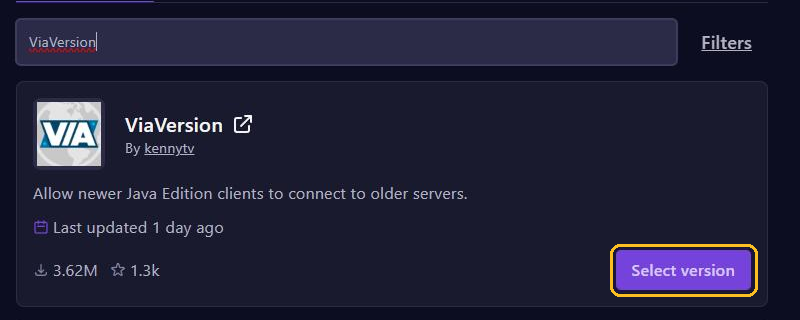
- Search for
ViaVersionand click Select version on the plugin by kennytv. - Pick the newest paper version and click Install plugin.
- Need ViaBackwards or ViaRewind too? Install them the same way.
- Restart your server. Don't use
/reload, because that can cause problems.
Then type viaversion list in the console. It shows which version each online player uses.
Things to keep in mind
- A player on an older version doesn't know the blocks and items that came to Minecraft later. ViaBackwards then shows something that looks like them.
- Some plugins, such as anti-cheats, can react differently to players on another version. Combat on 1.8 also works differently from new versions.
- After a new Minecraft release, it usually takes a few days before ViaVersion supports it. Then install the new version of the plugins through Plugins and restart your server.
Blocking versions
Want to keep certain versions out instead? Then open the file plugins/ViaVersion/config.yml in the File Manager and fill in block-versions. This, for example, blocks everything older than 1.20.5:
block-versions: ["<1.20.5"]With block-disconnect-msg in the same file, you choose the text those players see. Save the file and restart your server.
Mods and Bedrock
- Does your server run Fabric? Then use the ViaFabric mod, through Mods. Players still need the same mods as your server, so this mainly works with mods that only run on the server.
- For Forge and NeoForge there is no ViaVersion for the server.
- Players on a phone, tablet or console use Bedrock Edition. For them you need Geyser, not ViaVersion: see Let Bedrock players join with Geyser and Floodgate.